Intangible characters
An intangible character is a character with no body in the level — a voice on the phone, a narrator, an intercom, a disembodied entity. It takes part in a Dialogue and can be given lines, but because it never appears on screen it needs nothing beyond a name and a voice: no mesh, no level instance, no staging slot.
Libretto ships a ready-made base class for exactly this case, so you rarely have to implement the
LBRDialogueCharacter interface by hand.
Create one
Derive your character class from ULBRIntangibleCharacter. It is a BlueprintType,
Blueprintable UObject, so you can create a Blueprint from it directly in the Content Browser —
no C++ needed.
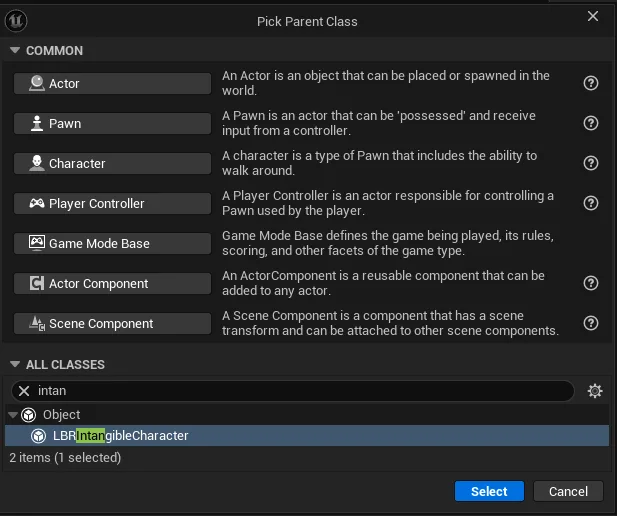
Because it derives from UObject (not AActor), an intangible character has no presence in the
world. When a Dialogue needs it, Libretto simply uses the class default object as the instance —
there is nothing to place or spawn.
Configure it
Everything you need lives in the class defaults. Two properties matter:
| Property | Type | Purpose |
|---|---|---|
CharacterName |
FText |
The display name shown in the editor and, when relevant, in-game (subtitles). Use localized text — it may be shown to players. |
CharacterGender |
ELBRCharacterGender (Male / Female) |
Feeds TTS voice selection when generating audio for this character. |
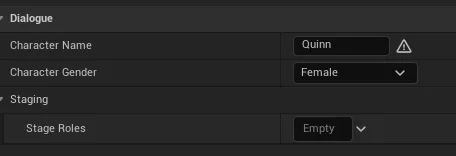
That is the whole setup. The base class already wires these into the interface: it returns
CharacterName from LBRGetCharacterName and CharacterGender from LBRGetCharacterGender.
Tip
The gender only drives which TTS voice is picked at generation. If you never generate synthetic audio for this character, you can leave it at its default.
Also available — staging roles
ULBRIntangibleCharacter also exposes a StageRoles property (a GameplayTagContainer,
surfaced through GetStageRoles). It is optional and empty by default; you only need it if you
match characters to stage slots by role. For a pure voice/narrator, leave it empty.
How it differs from a regular character
A body-bearing character usually derives from a base such as ALBRSimpleDialogueCharacter and
provides mesh components (LBRGetBodyComponent, LBRGetHeadComponent) used to bind animation,
lip-sync and camera tracks at generation. An intangible character deliberately supplies none of
these, so those tracks are skipped for it — only its spoken audio and subtitles are produced.
Its voice always plays in 2D
Because it has no binding in the level, an intangible character's lines are placed on a root
(unbound) audio track and played in 2D (non-spatialized) — by default, regardless of the
subdialogue's staging flags. You never need to set Libretto.Flags.Subdialogue.Staging.Audio2D
for an intangible speaker: that flag exists to force 2D audio for a body-bearing character (a
voicemail read by an on-screen actor, say), whereas an intangible one already behaves that way.