Runtime & sequencing
I want a trigger volume or interactable object to start a dialogue
Hold a reference to the placed Dialogue Instance and call StartDialogueInstance on it — that is
all a trigger needs. From your trigger volume's overlap event, or your interactable's "use" event,
call the instance and the dialogue plays. Selectors and entry-point queries are only for picking
which subdialogue runs — you don't need any of that just to launch.
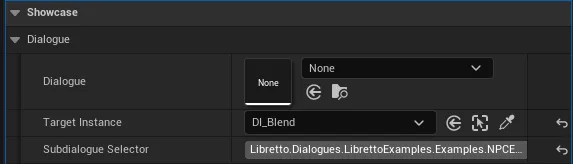
- Place your Dialogue in the level (drop the asset) so you have an
ALBRDialogueInstance, and expose a reference to it on your trigger (an instance-editable variable, or a level reference). - From your trigger/interaction event, call
StartDialogueInstanceon that instance. Done — no flags, no selectors required. - Only if you want designers to pick the dialogue and a selector from the actor's details
panel, use the entry-point pattern instead: add a
DialogueEntryPoint(FLBRAnyDialogueEntryPoint, instance-editable), implement theLBRHasGPTagMetainterface (overrideGetGPTagRootFilterto returnALBRDialogueInstance::GetSubdialogueSelectorsCategoriesFromAnyEntryPoint(DialogueEntryPoint)so the selector dropdown fills in), and launch withStartDialogueWithAnyEntryPoint— which also accepts a generic Dialogue, not just a placed instance.
Gotcha
If you use the advanced entry-point pattern, never put a breakpoint in GetGPTagRootFilter —
the editor calls it while drawing the details panel, so stopping there can freeze the editor and
force a hard close. For the simple case there is nothing to watch out for: StartDialogueInstance
just plays the instance.
See also: Runtime — starting from Blueprint · Runtime — triggering from your own objects · Getting started
I want one Dialogue to play a different scene depending on the situation
Put the branching logic in each subdialogue's condition, then just start the dialogue normally — Libretto walks the entry subdialogues in order and plays the first whose condition passes. One Dialogue asset can hold many entries (a greeting, a first meeting, a post-quest variant); a condition on each is the cleanest way to say "this one applies when…", and you don't have to encode the choice in the caller.
- On each entry subdialogue, set a condition (
ULBRDialogueDoneCondition— GPVars, gameplay tags, your own custom check). Order the entries most-specific first: the post-quest variant above the first-meeting variant above the default greeting. -
Launch plainly with
StartDialogueInstance. Candidates are evaluated in list order and the first one whose condition passes is played — leave a last entry with no condition as the catch-all default.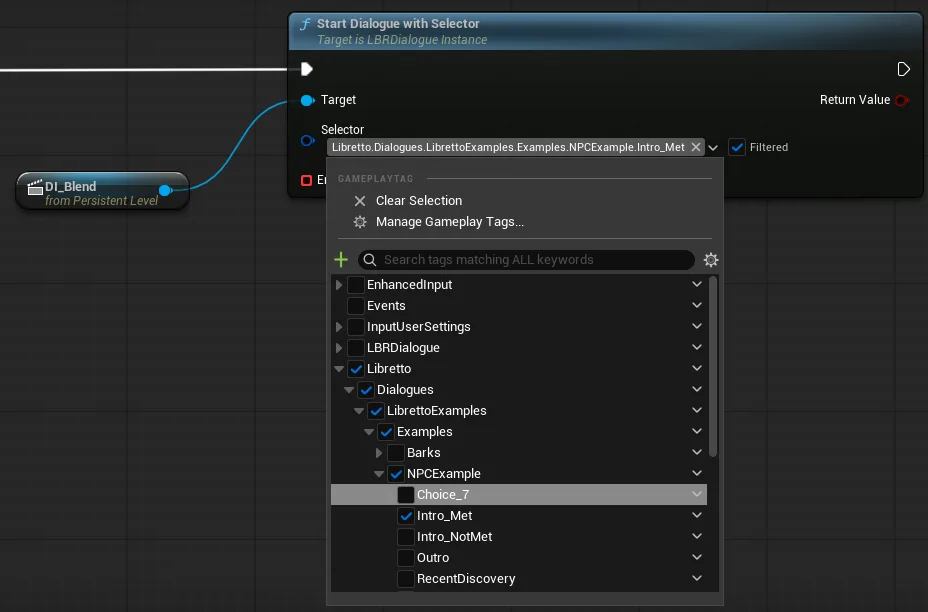
-
Only if the caller needs to force a particular variant (not the world state), reach for selectors: tag the subdialogues and start with
StartDialogueWithSelector/…Selectors/…SelectorQuery/…AnySelector. Selectors and conditions combine — the first subdialogue whose selectors match and whose condition passes wins.
Gotcha
Prefer conditions over deciding the branch in the caller. Selectors are a targeting handle
for when the calling code genuinely must pick a variant; putting the situational logic in the
subdialogue's condition keeps the branching with the content and reusable across every launch site.
If the selector tags on a StartDialogue* node look stale, recompile the Blueprint; and note
the old StartDialogue(SubdialogueName) is deprecated.
See also: Conditions · Runtime — starting from Blueprint · Runtime — subdialogue selectors
I want to run some code when a dialogue ends
Pick the callback that matches the scope you need: the End Event pin fires for one specific
playthrough, DialogueEndEvent fires on every exit of that instance, and the manager's OnDialogueEnd
fires globally. All three receive the ending — use the narrowest one that covers your case.
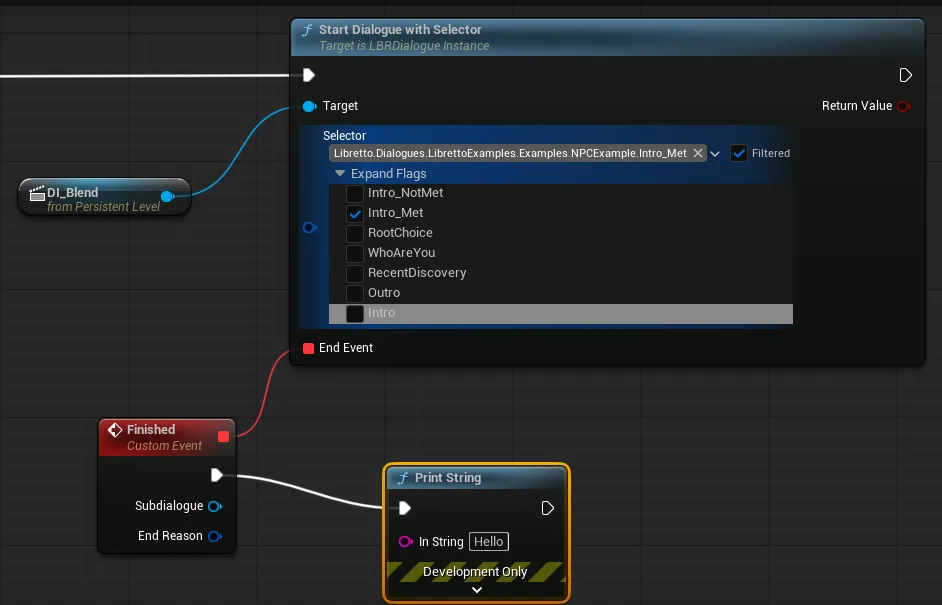
- This playthrough only — wire an event to the End Event pin on the
StartDialogue*node you called. It fires once, when that call ends. -
Every exit of this instance — on the placed Dialogue Instance, use Actor ▸ Add Event ▸
DialogueEndEvent(a multicast delegate onALBRDialogueInstance). It fires no matter how the dialogue was launched.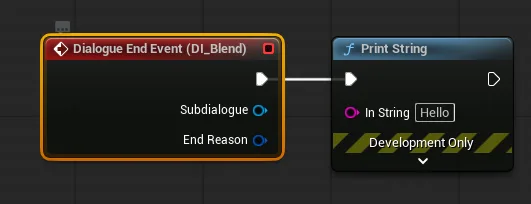 3. Anywhere in the project — bind the Dialogue Manager's global
 OnDialogueEnd(ALBRDialogueInstance*, end reason) to react centrally.
Gotcha
The End Event pin only fires for the StartDialogue* call that set it. If the same dialogue is
later launched another way — a trigger, another script — that pin is not called. For a callback
that survives across launches, use DialogueEndEvent (per instance) or OnDialogueEnd (global)
instead.
See also: Runtime — action at the end of a dialogue · Runtime — listing running dialogues
I want the player to skip the current line — or stop the dialogue entirely
Advancing and ending are two different calls: SentenceSkip jumps forward one line, while
StopDialogue (or StopAll) ends playback. Wire them to your input; the showcase player already
maps a Skip line and a Stop all dialogues action you can copy.
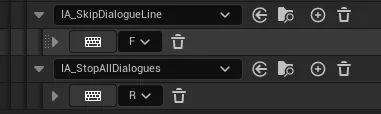
- Skip forward / back — call
SentenceSkip/SentenceSkipBackon the running Dialogue Instance. Guard the input with the manager'sCanSkipso you only offer it when there is a valid destination. - Skip a whole beat — set the subdialogue flag
SkipAsWhole(TAG_LBRSubDialogueFlag_SkipAsWhole): in that subdialogue a skip jumps to the next subdialogue instead of the next sentence — handy for skippable intros you don't want stepped through line by line. - Stop a running dialogue — call one of the Dialogue Manager helpers with an end reason:
StopDialogue(one instance),StopDialogueInstancesForDialogue(every instance of an asset),StopDialogueInstancesInvolving(every instance with a given character), orStopAll.
Gotcha
Stopping is not skipping. StopDialogue ends the dialogue — like the priority Interrupt
outcome, side effects that had not fired yet (GPFlags raised on later lines, line actions) will
not run. SentenceSkip only fast-forwards within the same dialogue, so its lines still play
out their effects. The showcase wires both on ALBRShowcasePlayer (SkipDialogueLine /
StopAllDialogues input actions) if you want a working reference.
See also: Runtime — stopping a dialogue · Priorities — ignored & interrupted dialogues
Two dialogues collide — I want to control which one wins
Give each dialogue a priority level and let the priority system resolve the pair; by default the lower-index (more important) one interrupts, the other is ignored. You only tune this when two dialogues can genuinely overlap — a bark firing during a staged scene, for instance.
- Make sure your priority levels are registered and ordered in Project Settings ▸ Libretto ▸
DialoguePriorities— index 0 is the most important. - For the pairs that need special handling, author the outcome in the priority editor
(
EWBP_LBRDialoguePriorities), per context (who is present). Leave the rest to the default index-order behaviour. - Pick outcomes that actually take effect today (see the gotcha): Interrupt, Pause or Ignore.
Gotcha
Muffle / Mute / PlayMuffled / PlayMuted currently behave like Play for sound. They set the
runtime flag and compute a volume modifier, but the base plugin can't apply it (the engine-side
audio-filter hook is unavailable), so the affected dialogue keeps playing at full volume. For
reliable priority behaviour today, stick to Interrupt, Pause or Ignore.
See also: Priorities — full reference · Priorities — default behaviour
I want to play a dialogue with no placed instance (voicemail, comms, a scene spawned on the fly)
Generate the Dialogue straight from the asset (no instance), then start it with a
StartGenericDialogue* function plus a spawn transform — Libretto spawns the Dialogue Instance for
you. A generic dialogue is simply one that plays without a pre-placed ALBRDialogueInstance; a
voice-over is one use, but it can just as well carry staged characters and animation spawned at the
transform you pass.
- Generate it from the asset — right-click the Dialogue ▸ Libretto ▸ Generate Sequences… (and Generate Assets… first for audio). Because this path takes no Dialogue Instance, what it produces is a generic dialogue — there is no separate "generate as generic" command.
- At runtime call the variant you need, passing the spawn transform:
StartGenericDialogue,StartGenericDialogueWithSelector,StartGenericDialogueWithSelectors, orStartGenericDialogueWithSelectorQuery. Each returns the spawnedALBRDialogueInstance. - If you don't know in advance whether you hold a placed instance or a generic Dialogue, use the
static
StartDialogueWithAnyEntryPoint— it accepts either.
Gotcha
Generic is about how it is launched (spawned from the asset vs. a placed instance), not about whether it has bodies: staged characters, cameras and animation work in a generic dialogue too. Do make sure the characters it needs are actually in the level when it runs, since a generic launch brings no placed instance to carry level references.
Generic dialogues aren't cooked into a packaged build by default
Because a generic dialogue has no placed instance in any map, nothing in the cooked levels references it — so the cooker never reaches it and it (together with its generated sequences) is left out of the package. It plays fine in the editor and in PIE, but in a shipped build the launch silently does nothing. Fix it by cooking the folder explicitly: Project Settings ▸ Packaging ▸ Additional Asset Directories to Cook (a.k.a. Directories to always package) — add the content directory that holds the generic Dialogue and its generated sequences, then repackage.
Play the voice in 2D (voicemail / intercom)
A voicemail, intercom or radio comm usually wants the voice to play flat in 2D, not spatialized somewhere in the world. Two ways to get that:
- Tick
Libretto.Flags.Subdialogue.Staging.Audio2Don the subdialogue — every line it contains is then placed on a root (unbound) audio track and played in 2D, whatever the staging. - Or give the lines to an intangible character — it has no body binding, so its voice plays in 2D by default, whatever the subdialogue's flags.
See also: Runtime — generic dialogues · Intangible characters · A voicemail with its transcription in a phone UI