Dialogue Priorities
When a dialogue tries to start while another dialogue is already running, Libretto has to decide what happens: does the new one play, wait, mute the old one, get ignored? This is the job of the priority system.
Every dialogue carries a priority level (a Blueprint class). When a new dialogue is requested, Libretto looks up the new priority, compares it against the priority of each running dialogue, and resolves the pair into an outcome. Outcomes can be fine-tuned per pair of priorities and per context (who is talking to whom), with a sensible default when nothing specific is configured.
Outcomes
The runtime enum is ELBRDialoguePriorityOutcome. Throughout this page:
- New — the dialogue that is trying to start.
- Running — the dialogue that is already playing.
| Outcome | Effect |
|---|---|
| Play | Play the New dialogue normally; leave the Running one untouched. |
| PlayMuffled | Play the New dialogue with muffled (attenuated) sound; leave the Running one untouched. |
| PlayMuted | Play the New dialogue with no sound; leave the Running one untouched. |
| Interrupt | Interrupt (end) the Running dialogue, then play the New one. |
| Muffle | Muffle the Running dialogue's sound while the New one plays. |
| Mute | Mute the Running dialogue's sound while the New one plays. |
| Pause | Pause the Running dialogue, then play the New one. |
| Ignore | Drop the play request — the New dialogue never starts. |
| Default | No explicit result — fall back to the default index-order behaviour (see below). |
Ignored dialogues run no side effects
When the outcome is Ignore, the New dialogue is dropped entirely, so any side effects it would have produced (raising GPFlags, running line actions…) are not applied. Likewise, Interrupt cuts the Running dialogue short: side effects that had not fired yet will not fire.
Info
PlayMuffled/PlayMuted act on the New dialogue; Muffle/Mute act on the Running
one. They are mirror images of each other — see Directionality.
How muffle/mute affect sound
Muffle and mute are expressed at runtime as instance flags on the affected dialogue:
Libretto.RuntimeFlags.Muffled and Libretto.RuntimeFlags.Muted. The volume intended for each flag
is configured in Project Settings ▸ Libretto under RuntimeFlagsToVolumeModifier — a list
mapping a GameplayTag query to volume multipliers (overall / animation / voice). The shipped defaults
are:
| Flag | Volume multipliers (default / animation / voice) |
|---|---|
Libretto.RuntimeFlags.Muffled |
0.1 / 0.1 / 0.1 |
Libretto.RuntimeFlags.Muted |
0.0 / 0.0 / 0.0 |
Volume attenuation is not applied in the base plugin
The Muffle, Mute, PlayMuffled and PlayMuted outcomes set the runtime flag and compute
the volume modifier, but the base plugin does not apply it to the audio: the Sequencer
audio-filter hook this relies on (IMovieSceneApplyAudioFilter) requires engine-side support
that is not available here, so it is disabled. In practice these outcomes currently behave like
Play for sound — the affected dialogue keeps playing at full volume, only flagged. For
reliable priority behaviour today, use Interrupt, Pause or Ignore. If your
engine build provides the audio-filter hook, re-enable it in ULBRLevelSequenceInstanceData to
make the volume modifier take effect.
Contexts
An outcome can depend on who is present in each of the two dialogues. Libretto gathers a
context for the pair and picks the first configured result whose context matches. Contexts are
GameplayTags under Libretto.Priority:
| Context tag | Meaning |
|---|---|
Libretto.Priority.NPC.Both |
An NPC (a shared character) is present in both dialogues. |
Libretto.Priority.Player.Both |
The player is present in both dialogues. |
Libretto.Priority.Player.New |
The player is present only in the New dialogue. |
Libretto.Priority.Player.Running |
The player is present only in the Running dialogue. |
A gathered context can combine the NPC tag with one of the player tags — for example
"a shared NPC and the player only in the New dialogue" is
NPC.Both + Player.New. A relation result with an empty context matches everything, so it
acts as the catch-all default for that pair of priorities.
The results × contexts matrix a project can configure therefore looks like this (an outcome is picked per cell; cells left empty fall through to All contexts, then to the default behaviour):
| Context | Outcome (example) |
|---|---|
| All contexts (empty context) | catch-all default for this priority pair |
NPC.Both + Player.Both |
shared NPC, player in both |
NPC.Both + Player.New |
shared NPC, player only in New |
NPC.Both + Player.Running |
shared NPC, player only in Running |
Player.Both |
no shared NPC, player in both |
Player.New |
no shared NPC, player only in New |
Player.Running |
no shared NPC, player only in Running |
How the context is built
The base implementation (ULBRDialoguePriority::GatherContext) adds a single Player.* tag
(Both/New/Running) from where the player is, and adds NPC.Both when the two dialogues
share at least one character. You can override GatherContext in a priority Blueprint to
compute a custom context.
Directionality (inverse lookup)
Relations are looked up from the New priority's side first. If the New priority defines no relation toward the Running priority, Libretto looks it up from the Running side and inverts the result, so you only have to author each pair once. The inversions are:
| Result found on the other side | Inverted result used |
|---|---|
| Play | Play |
| PlayMuffled | Muffle |
| PlayMuted | Mute |
| Interrupt | Ignore |
| Muffle | PlayMuffled |
| Mute | PlayMuted |
| Ignore | Interrupt |
| Pause | Ignore |
Default behaviour
When no relation result matches (outcome resolves to Default), Libretto falls back to the order of the priority list in Project Settings (see Priority levels):
- If the New priority has a lower index than the Running one (i.e. is more important), the outcome is Interrupt — the New dialogue interrupts the Running one.
- Otherwise (equal or higher index), the outcome is Ignore — the New dialogue is dropped.
In short: index 0 is the most important, and a more important dialogue interrupts a less important one by default.
Priority levels
A priority level is a Blueprint class that derives from ULBRDialoguePriority (an abstract,
Blueprintable UObject). Each project can define as many as it needs.
Libretto ships three example levels, ordered from most to least important:
BP_DialoguePriority_CinematicBP_DialoguePriority_StageBP_DialoguePriority_3C
With this order, a Cinematic dialogue interrupts a Stage or 3C dialogue by default, and so on.
Tip
The names Cinematic, Stage and 3C are arbitrary labels. They have no technical link to the dialogue types of the same name.
Registering the levels
The project's priority levels — and their order — live in Project Settings ▸ Libretto under the
DialoguePriorities array (ULBRDialogueCoreSettings). Order matters: the lower the index,
the more important the priority. This order defines the default behaviour.
The shipped defaults are declared in the plugin's DefaultLibretto.ini:
[/Script/LBRCore.LBRDialogueCoreSettings]
+DialoguePriorities=/Libretto/Blueprints/BP_DialoguePriority_Cinematic.BP_DialoguePriority_Cinematic_C
+DialoguePriorities=/Libretto/Blueprints/BP_DialoguePriority_Stage.BP_DialoguePriority_Stage_C
+DialoguePriorities=/Libretto/Blueprints/BP_DialoguePriority_3C.BP_DialoguePriority_3C_C

Deciding which level a subdialogue gets
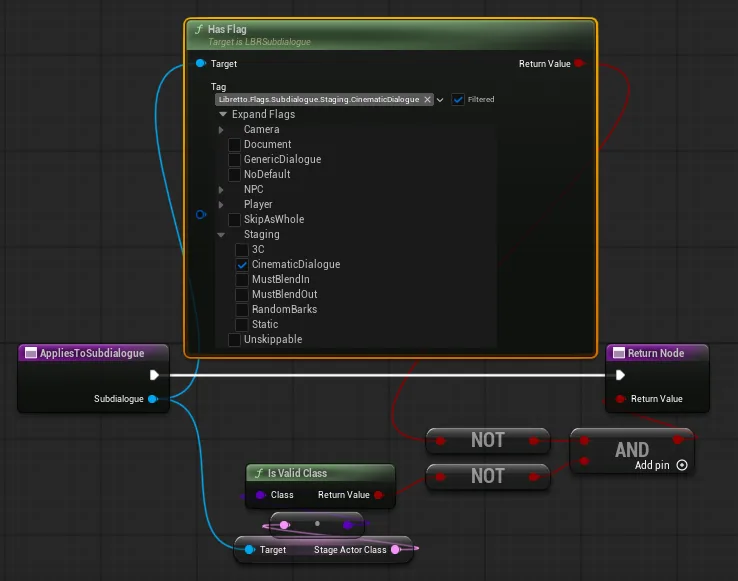
Override AppliesToSubdialogue in each priority Blueprint. It receives the subdialogue whose
priority is being resolved, lets you run any test you like, and returns a boolean — true if that
subdialogue belongs to this priority level. For example, the Cinematic level returns true when
the subdialogue carries the cinematic flag.
The priority of a subdialogue
Priority is resolved per subdialogue. When a subdialogue is opened, its default priority is
computed automatically by running each registered level's AppliesToSubdialogue in list order and
taking the first match. In the Dialogue Editor's details panel this appears (preview-only) as
Default Priority.
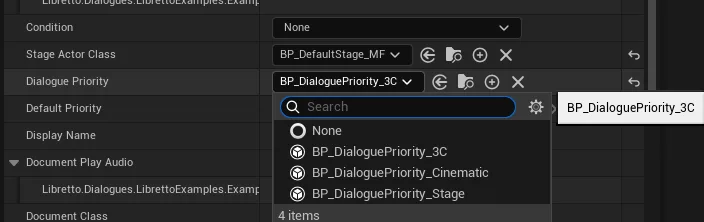
To force a specific level, set the subdialogue's DialoguePriority property. When it is filled,
it overrides the automatically detected one. So a subdialogue flagged Cinematic can still be
handled as Stage if you set its DialoguePriority to the Stage level.
Info
Resolution helpers live on the subdialogue: GetDefaultPriority() computes it from the settings,
and GetPriority() returns the custom DialoguePriority if set, otherwise the default.
Configuring relations — the priority editor
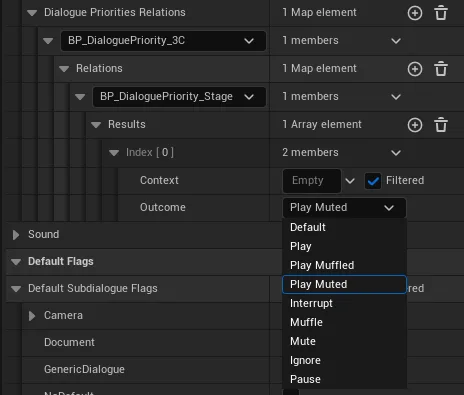
Relations between priority levels are stored in Project Settings ▸ Libretto under
DialoguePrioritiesRelations — a map keyed by priority class, each entry holding a list of
relations to other priority classes, and each relation holding an ordered list of
(context → outcome) results.
Editing that raw map by hand is tedious, so Libretto provides a dedicated editor widget:
EWBP_LBRDialoguePriorities. It is an Editor Utility Widget in the plugin's toolbar-widgets
folder, so it shows up in the Libretto toolbar dropdown of the main window.
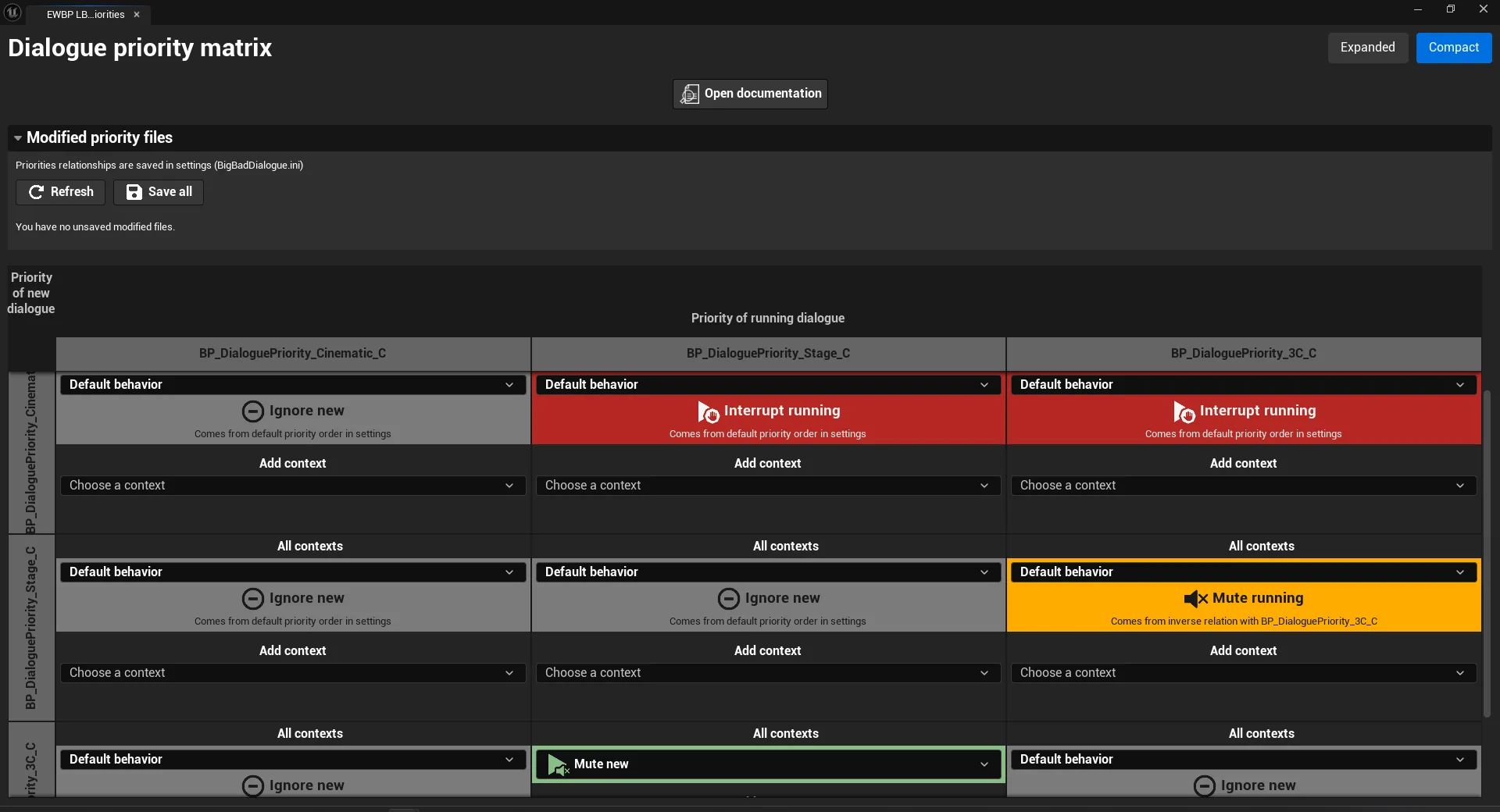
The editor presents priorities as a grid. For each pair of priorities you pick an outcome per context; each outcome has its own colour and icon (Play, PlayMuffled, PlayMuted, Interrupt, Muffle, Mute, Pause, Ignore). Within a cell, results are evaluated top to bottom, and the first matching context wins — so put more specific contexts above the catch-all All contexts entry.
Info
The contexts offered by the editor, and their colours/icons, come from
Editor Preferences ▸ Libretto – Dialogue Editor (ULBRDialogueEditorLocalSettings,
DialoguePriorityContextTagGroups under Priority Editor ▸ Context) and the matching
Priority Editor ▸ Theme settings (see Settings reference). The
default groups are exactly the four context tags listed above.
Data model recap
| Symbol | Role |
|---|---|
ULBRDialoguePriority |
Abstract base class for a priority level. Override AppliesToSubdialogue, optionally GatherContext / FindOutcome / InverseOutcome. |
ELBRDialoguePriorityOutcome |
The outcome enum (Default, Play, PlayMuffled, PlayMuted, Interrupt, Muffle, Mute, Ignore, Pause). |
FLBRDialoguePriorityResult |
One (Context → Outcome) pair. |
FLBRDialoguePriorityRelation |
The ordered list of results for one pair of priorities. |
FLBRDialoguePriorityRelationList |
All relations a priority defines toward other priorities. |
ULBRDialogueCoreSettings.DialoguePriorities |
The project's ordered list of priority levels. |
ULBRDialogueCoreSettings.DialoguePrioritiesRelations |
The configured relations between levels. |
ULBRDialogueCoreSettings.RuntimeFlagsToVolumeModifier |
Volume applied for the muffle/mute runtime flags. |