Dynamic Tags
Many features identify data through GameplayTags — dialogues, subdialogues, choices, replies,
and the metadata attached to them (how many times a dialogue was played, whether a choice was
selected, and so on). Maintaining a parallel list of tags by hand duplicates information:
hand-written .ini files drift out of sync with the assets, typos creep in, and packaging picks up
stale entries.
Dynamic Tags remove the duplication. Instead of storing the tags redundantly, Libretto walks the existing data when the project starts and generates the tags from the assets themselves. There is a single source of truth — the assets — so the tags can never desynchronise from the content they describe.
How tags are generated
At project load, the ULBRDialogueTagsSubsystem (module LBRCore) scans every Dialogue asset,
then registers a tag for the Dialogue and one for each of its Subdialogues, Choices and Replies. The
low-level registration is done by the ULBRDynamicTagsSubsystem (module LBRTags), which owns
the actual tag objects.
The generated tags follow this layout:
Libretto.Dialogues.<DialogueName>
Libretto.Dialogues.<DialogueName>.<SubdialogueName>
Libretto.Dialogues.<DialogueName>.Choice_<ID>
Libretto.Dialogues.<DialogueName>.Choice_<ID>.Reply_<ID>
The root (Libretto.Dialogues), the asset prefix (D_) and the Choice_ / Reply_ prefixes are
defaults declared on the ULBRDialogue class and can be overridden per Dialogue base class:
| Property | Default | Role |
|---|---|---|
TagRoot |
Libretto.Dialogues |
Root under which every dialogue tag is placed. |
AssetPrefix |
D_ |
Asset-name prefix used to find Dialogue assets on disk. |
ChoiceTagPrefix |
Choice_ |
Prefix for the per-Choice tag, suffixed with the line ID. |
ReplyTagPrefix |
Reply_ |
Prefix for the per-Reply tag, suffixed with the line ID. |
SelectorsTagRoot |
SubdialogueSelectors |
Sub-branch for group selectors shared by several subdialogues. |
Subdialogue tags double as the Subdialogue's unique selector. Group selectors — a tag shared by
several subdialogues, e.g. an "Intro" group — are placed under
Libretto.Dialogues.<DialogueName>.SubdialogueSelectors.<Name>.
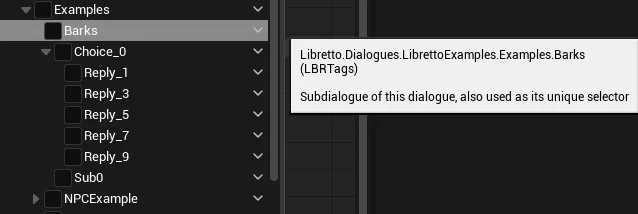
These tags are what the GPVar subsystem keys its metadata on (play counts, choice-selection counts, "has this been played" checks).
Packaged builds — the .ini fallback
Re-scanning every asset works well in the editor and at cook time, but a packaged game should not re-parse dialogues at runtime. Two files bridge that gap:
- At cook time, the generated tags are baked out to
Config/DynamicTags/DynamicTags.inias a standardGameplayTagListblock. In a packaged build the registrar adds that folder as a tag search path (AddTagIniSearchPath), so the tags are loaded from the.iniinstead of being regenerated by walking assets. - Alongside it,
Config/LBRDynamicTags.inistores the tag-to-dialogue index (a[TagsToDialogues]section mapping each dialogue root tag to its asset path) so a tag can be resolved back to the Dialogue it identifies without loading everything.
Path note
The exact fallback paths were read from the current source: the baked tag list lives at
Config/DynamicTags/DynamicTags.ini and the tag-to-dialogue index at
Config/LBRDynamicTags.ini. Earlier drafts referred to a per-dialogue
Config/Tags/Dialogues/<Name>.ini; that layout is not what the code produces today — trust
the two paths above.
Known limitations
Fragile FNativeGameplayTags mechanism
The engine offers no supported way to register a custom tag source at runtime, so Dynamic Tags
repurpose the FNativeGameplayTag mechanism — each generated tag is backed by a
new FNativeGameplayTag(...) instance created with the internal
ENativeGameplayTagToken::PRIVATE_USE_MACRO_INSTEAD token. This is a deliberate detour around an
API that is normally driven only by the UE_DEFINE_GAMEPLAY_TAG macros, and it is
sensitive to the engine version: a future Unreal release could tighten or change this path
and force a refactor on upgrade. If that happens, the clean fix is a small engine modification to
add a first-class dynamic tag source — which we prefer to avoid as long as the current approach
holds.
Tags must be registered early
Once the engine sets its internal bDoneAddingNativeTags flag, no further dynamic tags can be
added. Generation therefore has to run early in initialisation, before that flag is set. This
is handled internally (the scanner hooks module-loading / cook delegates), but it constrains when
tags can appear.
Not a Blueprint workflow
Dynamic Tags are not meant to be driven from Blueprint. The registration entry point
(RegisterTag) is technically BlueprintCallable but is flagged "do not use unless you know
what you are doing" — the whole system is expected to run automatically at load, so it is not
exposed as a general Blueprint API. Exposing it more broadly would be straightforward but has not
been needed.
Runtime cost
Parsing every dialogue at load has, in practice, stayed on the order of a few seconds even for a large game's worth of content. If it ever becomes a bottleneck, the intended answer is the cook-time bake described above (which the fallback already relies on) rather than trimming the scan.