Conditions
A condition is a small, reusable Blueprint (or C++ class) that evaluates a situation and answers a single yes/no question at runtime. Typical questions:
- Has the player already spoken to this character?
- Did they find that piece of a puzzle?
- Does their character have enough of some skill?
Conditions are the glue that makes dialogues reactive. In the Dialogue Editor they gate Reply lines, If / ElseIf branches, and whole subdialogues — but the same class is equally usable from any Blueprint (interactions, triggers, gameplay logic).
What a condition is
The base class for every condition is ULBRCondition (module LBRConditions). To make your
own, derive from it — or from a class that already derives from it — and implement the evaluation
logic.
Tip
Many needs are already covered by the ready-made conditions built on the GPVars system — check those before writing a new class. See GPVars & Conditions.
ULBRCondition is marked Abstract, Blueprintable, DefaultToInstanced and EditInlineNew,
so you can subclass it in Blueprint and it is meant to be instanced wherever it is used (more
on that under Instanced conditions).
Writing a condition
Override Evaluate — a BlueprintNativeEvent that returns the result of the test. In
Blueprint you implement the Evaluate event; in C++ you override Evaluate_Implementation().
The base declaration is pure-virtual, so every concrete condition must provide one.
// C++ signature to override
virtual bool Evaluate_Implementation() override;
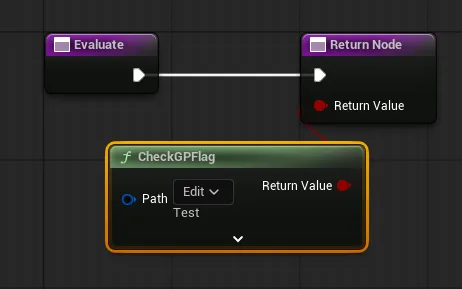
Evaluate takes no parameters and returns a bool. It is protected: callers do not invoke it
directly — they go through EvaluateWithCache, which decides whether
to run Evaluate at all.
Editor labels
To make a condition read clearly in the Dialogue Editor, override the label hooks. They surface a short description on the line carrying the condition:
| Override | Shown on |
|---|---|
GetLabel |
The Reply line (the generic label). |
GetLabelSuccess |
The If line (what the success branch means). |
GetLabelFail |
The Else line (what the failure branch means). |
Each is a BlueprintNativeEvent returning FText; the defaults return empty text.
Built-in operators
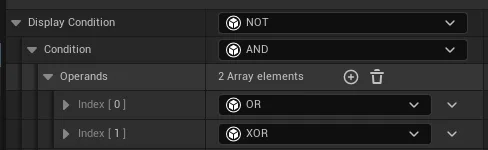
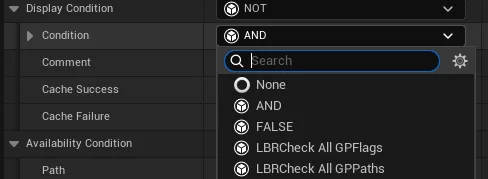
LBRConditions ships composable operator conditions so you can build expressions without writing
code. Each takes other conditions as its (instanced) operands:
| Condition | Display name | Result |
|---|---|---|
ULBRConditionAnd |
AND | true when all operands are true |
ULBRConditionOr |
OR | true when at least one operand is true |
ULBRConditionXOr |
XOR | true when exactly one operand is true |
ULBRConditionNot |
NOT | inverts its single Condition |
ULBRConditionFalse |
FALSE | always false |
ULBRConditionEmpty |
— | always true (the neutral condition) |
The success/failure cache
Evaluating a condition can be expensive, and the same condition may be checked repeatedly. Every
ULBRCondition can therefore store its evaluation result and skip re-running Evaluate. The result
is stored in the global condition history, so it survives level changes and
can be saved.
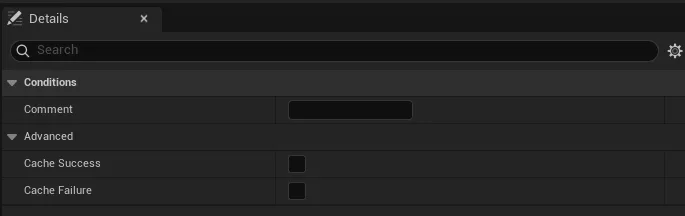
Two flags, found under the property's advanced section, turn caching on:
| Flag | Effect |
|---|---|
bCacheSuccess |
Once the condition evaluates to true, that result is cached and reused — no further checks. |
bCacheFailure |
Once the condition evaluates to false, that result is cached and reused. |
Enable one, the other, or both. Both default to false (always re-evaluate).
Warning
Caching assumes the answer will not change. Only enable it for conditions whose result is stable once reached (for example, "the player has completed the tutorial") — otherwise the stale cached value will be served indefinitely.
Calling a condition from Blueprint
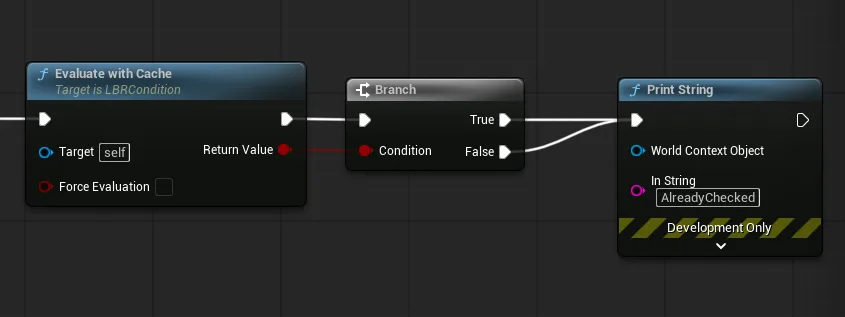
From any Blueprint, check the condition is valid, then call EvaluateWithCache:
- With
bForceEvaluation = false(the default), it returns the cached result when one is valid, otherwise it runsEvaluate, caches the result if the relevant flag is set, and returns it. - With
bForceEvaluation = true, it ignores the cache and always runsEvaluate.
Three helpers let you inspect and manage the cache manually:
| Function | Purpose |
|---|---|
IsStoredResultValid() |
Returns false if the condition was never evaluated, was invalidated, or if its stored result is no longer covered by its cache flags. |
GetStoredResult() |
Returns the stored result (without evaluating), or false when there is no valid stored result. |
InvalidateLastResult() |
Removes the stored result from the history so the next EvaluateWithCache re-runs Evaluate. |
The condition history
Cached results live in ULBRConditionHistorySubsystem, an engine subsystem: one global registry
for the whole game session, with the same lifetime as the GPVars. It is keyed by the path name of
each condition sub-object and is the only source of the cache: a condition keeps no result of its
own. In the editor, the history is emptied when a PIE session starts and when it ends.
A stored result is only used while the condition's flags still cover it: if you untick
bCacheSuccess on a condition, its stored true is ignored and the condition is re-evaluated.
From Blueprint:
| Function | Purpose |
|---|---|
Add(Path, bResult) |
Stores a result for a path. |
Remove(Path) |
Removes the entry of a path. |
CheckHistory(Path) |
1 = stored true, 0 = stored false, -1 = no entry at all. A stored false is never confused with a missing entry. |
ClearConditionsOf(Owner) |
Removes the entries of every condition contained in Owner (a dialogue, an actor, a package). Purging D_Foo leaves D_Foo2 untouched. |
ClearAll() |
Empties the history. |
In C++, FindConditionResult(Path, bOutResult) returns false when there is no entry; bOutResult
is only meaningful when it returns true.
To save the history, serialize the subsystem with a SaveGame archive, alongside
ULBRGPVarSubsystem. Loading a save replaces the whole history.
Gotcha
The history is global and nothing is purged automatically, not even when a level is
unloaded: the plugin cannot know whether a condition should stay frozen when the player comes
back. The results of conditions on level actors therefore pile up until you purge them. Call
ClearConditionsOf (or ClearAll) on whatever you no longer need.
Gotcha
The key is the condition's path name. Renaming or moving an asset loses the history of its conditions. There is no redirect.
Instanced conditions & ConditionContainer
A condition is a UObject, so a property that simply references one is null until you assign an
instance. There are two ways to get a condition that creates and owns its instance automatically.
1 — the Instanced specifier (C++). Mark a ULBRCondition* property Instanced and the
editor will let you pick a subclass and edit it inline, creating the sub-object for you:
UPROPERTY(EditAnywhere, BlueprintReadWrite, Instanced, Category = "Conditions")
TObjectPtr<ULBRCondition> MyCondition;
This is exactly how the operator conditions hold their operands (ULBRConditionOperator::Operands,
ULBRConditionNot::Condition).
2 — FLBRConditionContainer (no C++ needed). For the common case, use the ready-made struct
type — a thin wrapper whose single Condition field is already set up as Instanced:
USTRUCT(BlueprintType)
struct FLBRConditionContainer
{
    UPROPERTY(EditAnywhere, BlueprintReadWrite, Instanced, Category = "Conditions")
    TObjectPtr<ULBRCondition> Condition;
};
Expose an FLBRConditionContainer property and you get inline condition editing in the details
panel out of the box.
Conditions on dialogue lines
In the Dialogue Editor, conditions appear in three places:
- Reply lines carry two conditions:
- Display Condition — if false, the Reply is neither offered nor shown.
- Availability Condition — if false, the Reply is shown but greyed out and not selectable.
- If / ElseIf lines use a Success Condition — if true, the player enters that branch;
otherwise the next
ElseIf/Elseis evaluated. - Subdialogues carry a Condition that allows, or not, the subdialogue to play. On entry, candidate subdialogues are evaluated in order and the first one whose name matches and whose condition passes is played.
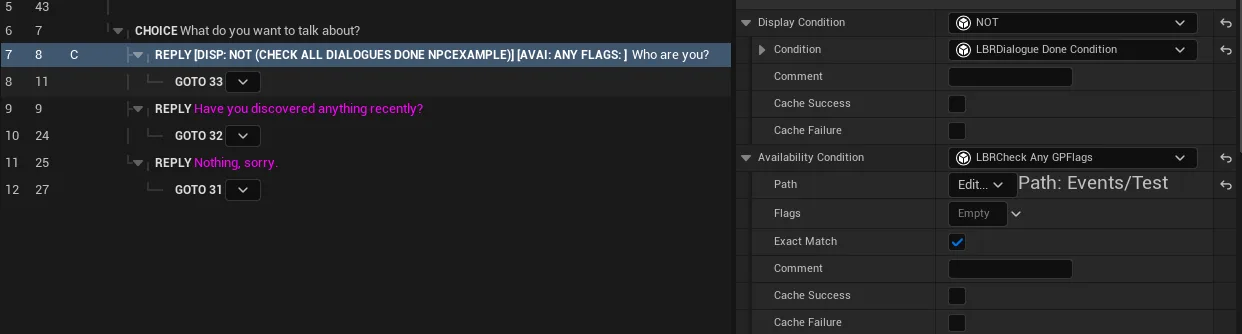
The GetLabel / GetLabelSuccess / GetLabelFail overrides described above are what render a
readable summary directly on these lines. See the Dialogue
Editor page for the authoring workflow.
Dialogue-played checks
To test "has this dialogue/subdialogue been played", use the dedicated
ULBRDialogueDoneCondition (in LBRCore) rather than a hand-written GPVar-path condition.
A counted variant, ULBRDialogueDoneCountedCondition, compares how many times a dialogue
or subdialogue was played. See GPVars & Conditions.