Custom Track Generators
Generation fills a dialogue's Level Sequences by running a list of track generators — one per kind of Sequencer track (animation, audio, cameras, events, lip-sync, subtitles). This list is open: you can add your own generator to lay down a Sequencer track type Libretto does not ship, and it participates in the exact same generation pipeline as the built-in ones.
This page covers the extension point — the ULBRTrackGenerator base class, its override hooks,
and how to register your subclass so it appears in the Generate Sequences options. For the
pipeline that drives these hooks, see the Generation Overview.
The old \"Animatic Text Track\" is not part of Libretto
An Animatic Text Track (on-screen animatic text with position and blend-in/out) existed in the internal BigBadTools editor toolset. That was a separate Sequencer track type, not shipped with Libretto, and it is unrelated to the dialogue generation pipeline described here. If you need on-screen text during a generated sequence, write a custom track generator (below) — that is the supported extension point.
Where track generators fit
When you press Generate, the generation subsystem loads the track-generator classes registered in the project settings, instantiates them, and calls their hooks in a fixed order for every subdialogue, sequence and line. Each generator owns one track type: it creates its track, fills it line by line, and cleans up its previous output on regeneration.
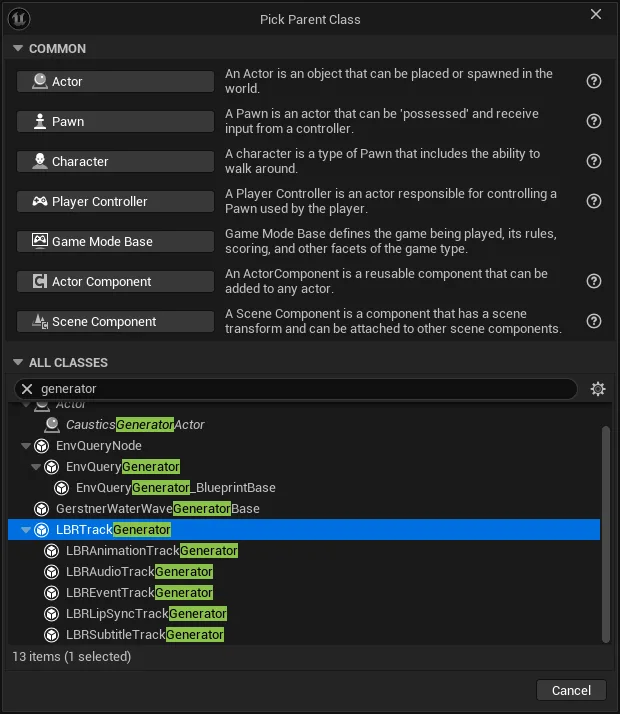
The built-in generators — LBRAnimationTrackGenerator, LBRAudioTrackGenerator,
LBRCameraTrackGenerator, LBREventTrackGenerator, LBRLipSyncTrackGenerator and
LBRSubtitleTrackGenerator — are all ULBRTrackGenerator subclasses. Your own class joins the list
on equal footing.
The ULBRTrackGenerator base class
ULBRTrackGenerator is an abstract, BlueprintType UObject in the LBRSequenceGenerator
module. Every hook is a BlueprintNativeEvent, so you can implement a generator in C++ (override
the _Implementation) or in Blueprint (override the event) — the built-in subtitle and event
generators are Blueprintable.
While it runs, the generator can reach the shared generation context through its Generator field,
a pointer to the owning ULBRSequenceGenerator (current dialogue, dialogue instance, master
sequence, cached character GUIDs, per-sentence data, and so on).
Track identity — GetTrackID
UFUNCTION(BlueprintNativeEvent, Category = "Generation")
FGameplayTag GetTrackID() const;
Returns the GameplayTag that identifies the track type this generator produces. It is used to filter
which generators run for a given generation request: a generator runs when the request carries either
its GetTrackID() tag or the catch-all Libretto.Generation.Tracks.All flag.
The base implementation returns Libretto.Generation.Tracks (TAG_LBRFlag_TrackTypeRoot), the
root of the track-type hierarchy. Built-in generators return leaf tags under it, for example:
| Generator | Track ID |
|---|---|
LBRAnimationTrackGenerator |
Libretto.Generation.Tracks.PostureGesture |
LBRAudioTrackGenerator |
Libretto.Generation.Tracks.Audio |
LBRCameraTrackGenerator |
Libretto.Generation.Tracks.Camera |
LBREventTrackGenerator |
Libretto.Generation.Tracks.Event |
LBRSubtitleTrackGenerator |
Libretto.Generation.Tracks.Subtitle |
Define your own leaf tag under Libretto.Generation.Tracks and return it here, so your track can be
toggled independently in the Generate Sequences wizard. Multiple generators may share the same
track ID if you want them enabled together.
The All flag
A full generation is normally run with Libretto.Generation.Tracks.All checked, which
overwrites every registered track type — yours included — regardless of the per-track
checkboxes. This is the value Tracks to Generate defaults to; without it, a generation can
produce an empty result. See Running generation.
Lifecycle hooks
All hooks are optional (BlueprintNativeEvent); the base does nothing, so override only the ones you
need. They are called in this order over a generation:
| Hook | Signature (params) | When it runs | Typical use |
|---|---|---|---|
InitDialogue |
(const FLBRGameplayTagFlags& Options) |
Once, at the start of a dialogue. | Build caches / factories that live for the whole dialogue. |
InitSubDialogue |
(ULBRSubdialogue* Subdialogue, const FLBRGameplayTagFlags& Options) |
On each subdialogue change (stage setup). | Reset per-subdialogue state. |
InitSequence |
(ULevelSequence* CurrentSequence, const FLBRSequence& DialogueSequence, const FLBRGameplayTagFlags& Options) |
When a (non-locked) sequence asset is (re)built. | Create and initialize your actual Sequencer track/sections in the asset. |
CleanSequence |
(ULevelSequence* CurrentSequence, const FLBRGameplayTagFlags& Options) |
On regeneration of a reused sequence. | Remove your previously generated tracks/sections so they can be rebuilt. |
InitSentenceData |
(int32 CurrentIndex, ULevelSequence* CurrentSequence, const FLBRSequence& DialogueSequence, FLBRSequenceSentenceData& SentenceData, const FLBRGameplayTagFlags& Options) |
Per line, before any generator populates it. | Influence the shared per-sentence data (e.g. extend the line's duration) before others read it. |
PopulateSequenceForLine |
(same params as above, returns FLBRGameplayTagFlags) |
Per line. | Generate this generator's content for the line. May return flags requesting additional generation. |
FinishSequence |
(ULevelSequence* CurrentSequence, const FLBRSequence& DialogueSequence, const FLBRGameplayTagFlags& Options) |
After all lines of a sequence are populated. | Wrap up the sequence — you can analyse data other generators produced. |
FinishGeneration |
() |
Once, at the very end. | Final clean-up, save logs, release caches. |
Cleaning up after yourself
Each generator is responsible for removing the tracks it previously created before recreating
them — do that in CleanSequence. Tracks placed under a folder listed in Folder Names To
Save (default VFX, Audio) are not overwritten on regeneration, even with the All flag,
which lets hand-made additions survive.
PopulateSequenceForLine — the core hook
UFUNCTION(BlueprintNativeEvent, Category = "Generation")
FLBRGameplayTagFlags PopulateSequenceForLine(
    int32                       CurrentIndex,
    ULevelSequence*             CurrentSequence,
    const FLBRSequence&         DialogueSequence,
    FLBRSequenceSentenceData&   SentenceData,
    const FLBRGameplayTagFlags& Options);
This is where most generators do their work. For the line at CurrentIndex, add sections to the
track you created in InitSequence, reading the resolved per-line data from SentenceData
(speaker/listener, line duration, goto destinations…). The base returns
FLBRGameplayTagFlags::EmptyFlags; return non-empty flags only if the line needs additional
generation (the built-in event generator, for instance, can request a follow-up loop sequence).
Writing your own generator
- Create a class deriving from
ULBRTrackGenerator— a C++UCLASSor a Blueprint (the base isBlueprintType; make your C++ subclassBlueprintableif you want to extend it further in Blueprint, as the shipped subtitle/event generators do). - Define a leaf track tag under
Libretto.Generation.Tracksand return it fromGetTrackID. - Override the hooks you need — at minimum
InitSequence(create your track),CleanSequence(remove your previous track) andPopulateSequenceForLine(fill it per line). - Register the class in the project settings (below). It then appears in the Generate Sequences wizard's Tracks to Generate list and runs with the rest.
Start from a built-in generator
The simplest reference is LBRSubtitleTrackGenerator: it overrides only GetTrackID,
InitSequence, PopulateSequenceForLine and CleanSequence — the exact minimal shape of a new
track type.
Registering the generator
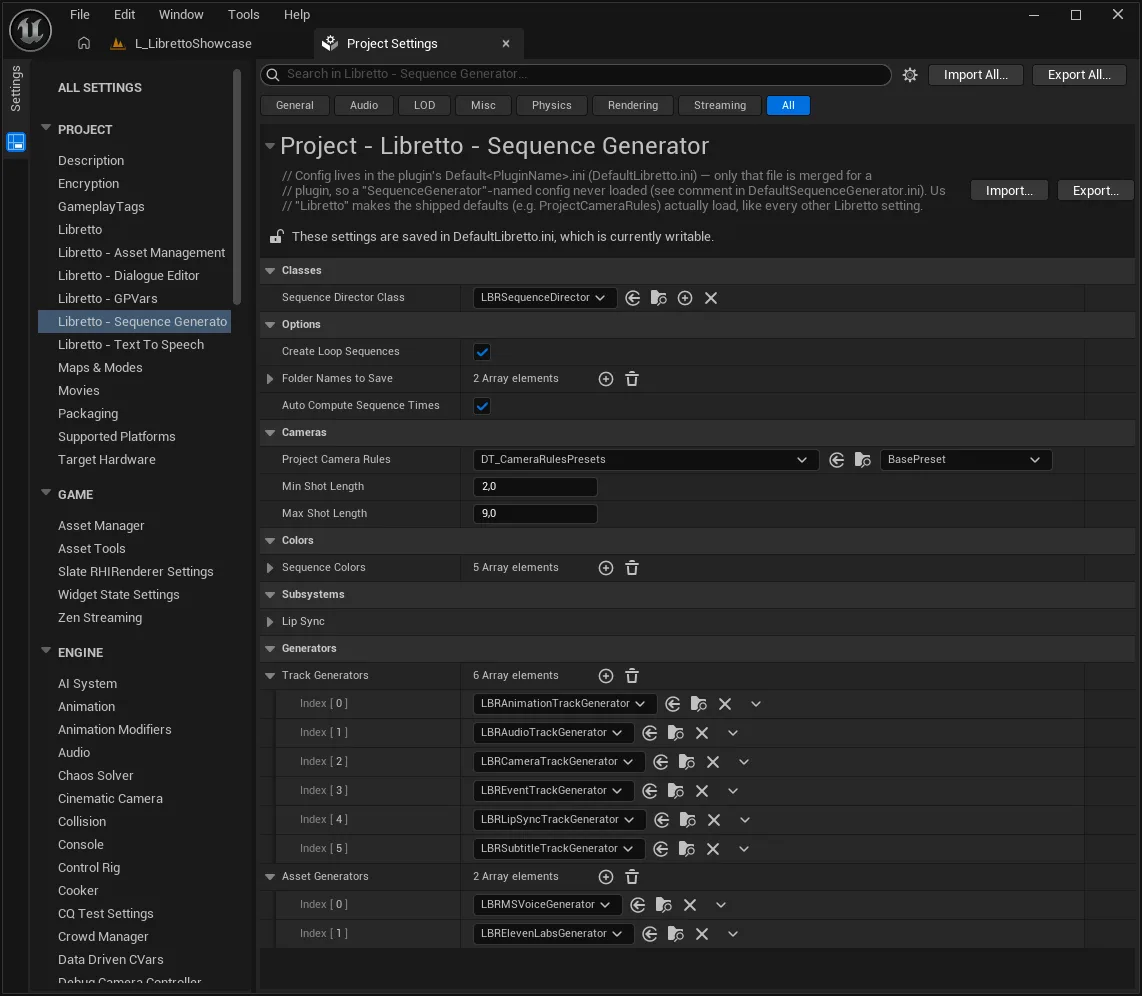
Track generators are registered in Project Settings ▸ Libretto – Sequence Generator (the
ULBRSequenceGeneratorSettings class), in the Track Generators array. Add your class there; the
default list holds the six built-in generators:
Libretto – Sequence Generator ▸ Track Generators
  LBRAnimationTrackGenerator
  LBRAudioTrackGenerator
  LBRCameraTrackGenerator
  LBREventTrackGenerator
  LBRLipSyncTrackGenerator
  LBRSubtitleTrackGenerator
  ← add your class here
This array is what drives the Tracks to Generate list in the Generate Sequences wizard: once registered, your generator shows up there and can be toggled like any other track type.
Asset generators are a separate list
If your track consumes a new kind of asset that must be produced first (as audio tracks
consume TTS audio), that asset production belongs in an asset generator (ULBRAssetGenerator,
registered in the Asset Generators list) — asset generation runs before track generation.
See Asset generators.