Reading Dialogues in 2D Interfaces
A Dialogue does not have to be played as a scene. It can also be read by a 2D interface of your
own, whatever its shape: a letter or a terminal page, a phone messaging thread, a popup with a
choice, a voicemail transcription, a lock screen that waits for a code, to name a few. This page explains how: the reading helpers
that walk a Dialogue outside of the Sequencer, the Staging.Interface2D flag, typed-input choices
and the default reply, and the example 2D reader, views and device shipped with the showcase.
For the played version (stages, 3C, cinematics, StartDialogue*), see
Playing dialogues. For worked examples to draw from, see the
2D interfaces FAQ.
What is in the product, and what is an example
| Layer | Where | What it gives you |
|---|---|---|
| Reading helpers | Product, ULBRDialogueReadingLibrary (module LBRCore) |
The Libretto semantics of a Dialogue without the Sequencer: which subdialogue plays, the next step after a line, If/Else, Goto, valid replies, the default reply, typed input, line effects, "done" flags. |
Staging.Interface2D flag |
Product | Marks a subdialogue as read by a 2D interface: no sequence and no stage are generated, voices still are. |
| 2D reader, view contract, views, device | Examples, module LibrettoExamplesRuntime |
One way to build 2D interfaces on top of the helpers. Read it, copy it, replace it: your game's UI is yours. |
The helpers are the part you rely on. The example reader and views are there to show one complete implementation, and to be read rather than extended.
The Staging.Interface2D flag
Tick Libretto.Flags.Subdialogue.Staging.Interface2D on every subdialogue that a 2D interface
reads.
- Generation skips it: no sub-sequence, no stage binding, no camera. Its audio assets are still generated (imported voices, text to speech), so a voicemail can play a real voice.
- A played dialogue never enters it: a Dialogue Instance does not pick an
Interface2Dsubdialogue, and a Sequencer jump to one ends the dialogue. - A dialogue whose subdialogues are all
Interface2D(orAudio2D) is generic: it needs no placed instance. - Word counts: its lines are left out of the spoken words, and kept in the localizable words.
- It cannot be combined with
3C,CinematicDialogue,RandomBarksorAudio2Don the same subdialogue. The combination is reported when the Dialogue is compiled, and the asset still saves.
Child flags are yours to define, one per kind of interface. The examples declare
Interface2D.Document, .Messaging, .Voicemail, .Popup and .Lock, plus the line flag
Libretto.Flags.Lines.Interface2D.Title (the line used as a page title). Filtering on
Interface2D accepts all of its children.
The reading helpers
ULBRDialogueReadingLibrary is a stateless Blueprint function library (category
Libretto ▸ Reading). A few rules hold for every function:
- A line is designated by its index in the Dialogue's line arrays.
ULBRDialogue::GetIndex(ID)converts a line ID into an index. - Flag filter. Functions that take a
FlagFilteronly accept subdialogues that have that flag (hierarchically). An empty filter accepts every subdialogue. - Conditions are evaluated with their cache (
EvaluateWithCache, never forced): a condition withbCacheSuccessorbCacheFailurefreezes its result the first time it is displayed. See Conditions — caching. - No "done" flag is raised for you. Your interface decides when a page counts as read or a
thread as finished, and calls
MarkSubdialogueDoneorMarkDialogueDone. - Invalid data never crashes. A null dialogue or an index out of bounds returns an
Invalidresult and logs a warning.
| Function | Returns | Purpose |
|---|---|---|
FindFirstPlayableSubdialogue(Dialogue, FlagFilter) |
Subdialogue | The first subdialogue, in asset order, that passes the filter and its condition. |
GetPlayableSubdialogues(Dialogue, FlagFilter) |
Array | Every playable subdialogue, in order: a table of contents, the list of threads of a phone. |
GetSubdialogueEntry(Dialogue, Subdialogue, FlagFilter) |
FLBRReadStep |
The first step of a subdialogue (comments and If lines skipped). |
GetNextStep(Dialogue, FromLineIndex, FlagFilter) |
FLBRReadStep |
The step after a displayed line, or after a chosen reply (it enters the reply's body). Handles If/ElseIf/Else, the end of a reply, Goto -1 (end), -2 (next playable subdialogue) and Goto to an ID. |
GetValidReplies(Dialogue, ChoiceIndex) |
Array of FLBRReplyOption |
The replies to offer: DoOnce replies already taken and replies whose Display condition fails are removed; bAvailable is false when the Availability condition fails (show it greyed out); bIsDefault marks the default reply. |
GetDefaultReply(Dialogue, ChoiceIndex) |
Line index | The default reply, if it is still valid. INDEX_NONE otherwise. |
FindReplyMatchingInput(Dialogue, ChoiceIndex, Input, bIsDefault) |
Line index | The reply whose text matches what the player typed, or the default reply (bIsDefault true). See Typed input. |
RecordReplyChosen(Dialogue, ReplyIndex) |
— | Records the reply in the GPVars, exactly as a played dialogue does. |
GetRetainedReply(Dialogue, ChoiceIndex, ReplyIndex) |
None / Single / Ambiguous |
Which reply of a choice was taken before: none, exactly one, or several. |
ApplyLineEffects(WorldContext, Dialogue, LineIndex) |
— | Applies the line's SetTags, then RemoveTags, then its actions. Every action runs, even if one of them starts another dialogue. |
MarkSubdialogueDone(Dialogue, Subdialogue) / MarkDialogueDone(Dialogue) |
— | Raises the same "done" flags as a played dialogue, so ULBRDialogueDoneCondition sees them. |
A step (FLBRReadStep) tells you what to do next:
Kind |
Meaning | Fields |
|---|---|---|
Line |
Display this line (Text, Cinematic, Silence). |
LineIndex, Subdialogue |
Choice |
Present this choice and wait for the player. | LineIndex, Subdialogue |
End |
The reading stops. | EndReason |
Subdialogue changes when a Goto crosses into another subdialogue. EndReason is one of
EndOfSubdialogue (Goto -1 or natural end), OutOfFilter (a jump to a subdialogue that does not
pass the filter, such as a played 3D subdialogue), InvalidDestination (a Goto to an unknown ID),
StepBudget (a Goto cycle) and Invalid.
The reading loop
With those helpers, a reader is a short loop. This is what the example reader does:
- Pick the subdialogue:
FindFirstPlayableSubdialogue(Dialogue, Interface2D), or the one your UI chose. - Get its first step with
GetSubdialogueEntry. - While the step is a
Line: display it, callApplyLineEffects, thenGetNextStepfrom that line. - On a
Choice: displayGetValidRepliesand wait. When the player picks a reply, callRecordReplyChosen, thenApplyLineEffectson the reply, then continue withGetNextStepfrom the reply. - On an
End: close the page, the thread or the popup.
Keep Libretto rules out of your UI
Your loop should only look at FLBRReadStep. If you find yourself reading a GPVar path, a line
Type or a condition directly, a helper is doing that job for you already.
Typed input and the default reply
A lock screen, a password or a riddle is a Choice whose replies are the accepted answers. The
player types, and FindReplyMatchingInput finds the reply:
- it compares with the replies that are offered and available, the default reply excluded;
- leading and trailing spaces are ignored, and so is case. Accents count:
caféis notcafe; - the reply text is compared in the current culture, so a translated password is typed in the language being played;
- when nothing matches, it returns the default reply with
bIsDefaulttrue, orINDEX_NONEif there is none.
The default reply (Default Reply on a Reply) is the reply taken when the player gives no valid
answer: the time of a timed choice runs out, or the typed input matches nothing. It can
therefore be set on an untimed choice too. There is at most one per Choice.
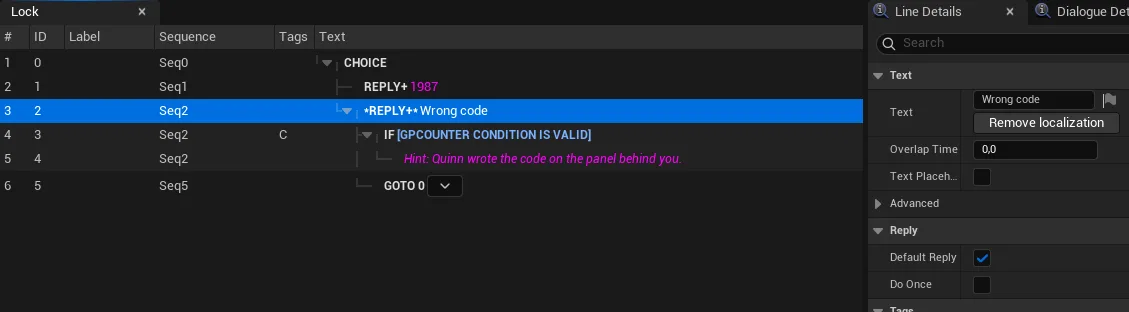
Gotcha: a default reply is DoOnce by default
Like every reply, a default reply has bDoOnceReply ticked by default. Once it has been
taken, it is no longer valid: the second wrong code finds no fallback, and
FindReplyMatchingInput returns INDEX_NONE. For a lock or a riddle that the player can fail
several times, untick DoOnce on the default reply.
The example 2D reader
The example module ships a reader, ULBRInterface2DReader, and a view contract,
ILBRInterface2DView. The reader walks the Dialogue with the helpers; the view displays what it
receives and decides the pacing (delays, "is typing…", a page displayed at once).
The reader runs until the next blocking step, a choice or an end. Each line is sent to the view, then its effects are applied in the same frame. If an action closes the view, the reading stops cleanly.
Reader → view (BlueprintNativeEvent) |
Sent when |
|---|---|
EnterSubdialogue(Subdialogue) |
The reading enters a subdialogue. A root view picks its subview from the flags. |
ShowText(Line) |
A line is displayed. FLBRInterface2DLine carries Text, SpeakerName, Flags, TypedActions (presentation hints such as an image), Audio (never played by the reader) and bReplay. |
PresentReplies(ChoiceIndex, Options, TimeLimit) |
A choice waits. TimeLimit is 0 for an untimed choice. |
ReplyChosen(ReplyIndex, bReplay) |
A reply was chosen, e.g. to display the sent message. |
Unlocked() / NoMatch() |
Typed input matched an answer / matched nothing. |
Finished(Reason) |
The reading stopped by itself. |
| View → reader | Effect |
|---|---|
Start(Dialogue, Subdialogue, View) |
Enters the subdialogue (the first playable Interface2D one if null) and reads. |
Reconstruct(Dialogue, Subdialogue, View) |
Replays what was already read, then goes on live. See Reconstruction. |
ChooseReply(ReplyIndex) |
Records the reply, applies its effects and reads its body. |
SubmitInput(Text) |
A matching answer sends Unlocked, marks the lock subdialogue done and takes the reply. The default reply sends NoMatch and takes it. No match at all sends NoMatch and presents the choice again. |
TimeOut() |
Takes the default reply if there is one; otherwise the choice keeps waiting. |
Stop() |
Stops without Finished, e.g. when the view closes. |
The reader raises no "done" flag, except for a lock that was opened. The views raise the others, each according to its use.
Typed actions: presentation hints
A line can carry actions that do nothing by themselves (DoAction is empty) but tell the view how
to present it. The view reads them from TypedActions:
Interface2D Image(ULBRI2DImageAction): an image shown with the line;Interface2D Play Audio Subdialogue(ULBRI2DPlayAudioSubdialogueAction): anAudio2Dsubdialogue of the same Dialogue, played when the player presses Play (a voicemail).
Their properties are not editor-only, so they are read in a packaged game.
Reconstruction
A messaging thread shows what was already said each time the phone is reopened. Libretto keeps no transcript: the thread is rebuilt from the GPVars, which already record every reply taken.
Reconstruct reads the thread with bReplay set. It applies no effect, raises no "done" flag
and plays no audio; it still sends the presentation hints. At each choice:
- if exactly one reply was taken before (
GetRetainedReplyreturnsSingle) and the choice was not met yet during this reconstruction, the reader sendsReplyChosen(bReplay)and follows it; - otherwise (never answered, several replies taken, or met a second time), the replay ends and the choice is presented live.
Two rules follow, and they matter when you write a thread:
- A thread does not go through the same choice twice. A thread that loops back to a choice stops being rebuilt at the second pass: the player answers it again.
- Conditions in a thread should be cached. A condition is evaluated again during the
reconstruction. If its result may have changed since the thread was read, the rebuilt thread
takes another branch. Tick
bCacheSuccess/bCacheFailureon conditions that decide what a thread already said.
The example views and device
The views are C++ UUserWidget classes that build their layout in code, in
LibrettoExamplesRuntime/Interface2D/. They share a base, ULBRI2DView (frame, title, close
button, Open(Dialogue, Subdialogue), OnClosed, OnFinished).
| View | Use | Marked done by the view |
|---|---|---|
ULBRI2DDocumentView |
Table of contents (the Document subdialogues, titled by their Title line), a page displayed at once, images. |
The page, when it is opened. |
ULBRI2DPhoneView |
Enters on the lock if it is not done yet, on the home screen otherwise. Tiles for the threads and the voicemail. | — |
ULBRI2DLockView |
Input field and the NoMatch / Unlocked feedback. |
Raised by the reader. |
ULBRI2DMessagingView |
A thread named after its speaker, rebuilt on opening, with typing delays. | The thread, when it finishes. |
ULBRI2DVoicemailView |
The transcription and a Play button. | The voicemail, when its audio ends. |
ULBRI2DPopupView |
A text and a timed choice. | The subdialogues read, at the end. |
ALBRI2DDevice opens a view on a Dialogue. It is a showcase trigger used with the Interact key:
it holds a direct reference to the Dialogue (so the cook follows it) and a View Class. The
caller picks the view: the Dialogue says nothing about how it is displayed. The device gives the
input to the UI while the view is open, and gives it back to the game when it closes.
Saving
Everything a 2D interface needs to reopen in the same state is already in two objects: the GPVars (replies taken, "done" flags, your own tags) and the condition history (frozen condition results). Save both with your save game and the document, the threads and the lock come back as the player left them. See Save and restore Libretto state.
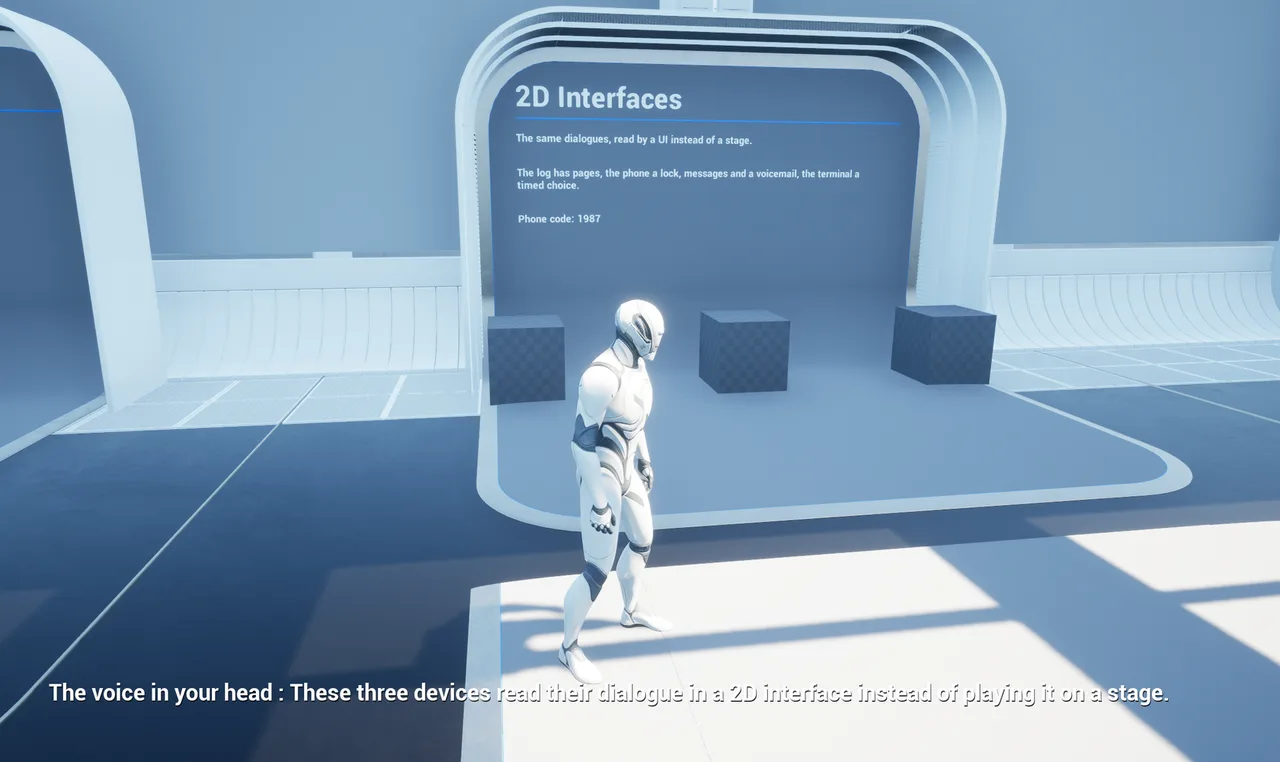
Try it: the "2D Interfaces" station
The "2D Interfaces" station of the tutorial map L_LibrettoTutorial puts the three example
dialogues on three devices:
| Dialogue | Device | Shows |
|---|---|---|
D_I2D_Document |
Document | Pages with an image, a branch on whether the phone is unlocked, and an addendum that appears once the voicemail was heard. |
D_I2D_Phone |
Phone | A lock (the code is on the station panel, a hint appears after three wrong codes), two threads (the second appears once the voicemail was heard), a voicemail with its Audio2D subdialogue. |
D_I2D_Popup |
Terminal | A first notice with a timed choice, then a "welcome back" page that depends on the reply taken. |
They live in /Libretto/Examples/Interface2D/Dialogues/.
Packaging a voicemail
The voicemail plays its audio as a generic dialogue: no map references it, so the cooker does not reach its generated sequence and sounds. Add the folder that holds them to Additional Asset Directories to Cook, as for any generic dialogue. The document, the phone texts and the popup need nothing: the device references the Dialogue.
See also: 2D interfaces FAQ · Conditions · GPVars · Blueprint API