Extensions & troubleshooting
I want dialogue audio to go through Wwise instead of Unreal's built-in sounds
Add the optional LibrettoWwise extension and point Libretto's two audio extension points at its
Wwise classes — generation then produces Wwise-backed audio in place of Unreal USoundBase assets.
Nothing else in the pipeline changes.
- Get and enable the plugin. LibrettoWwise ships apart from the main plugin and is not on Fab (it pulls a hard dependency on the Audiokinetic Wwise plugin) — ask on Discord. Enable it alongside the Wwise plugin, and connect Unreal to Wwise (the Wwise Browser panel; tick Auto Connect to WAAPI to reconnect on startup).
- Swap the two classes. In Project Settings ▸ Libretto, set
AudioAssetClasstoULBRWwiseAudioAsset; in Project Settings ▸ Libretto – Sequence Generator, replace the default audio track generator withULBRWwiseTrackGenerator. - Set the Wwise roots. In the Libretto – Wwise settings, fill the import/event root paths (TTS
vs final voice) and the import language. Generation then imports each line as a Wwise Sound Voice
and lays down its
<VX_…>_Playevent automatically.
Gotcha
Wwise must be running and connected over WAAPI whenever you generate — both the voice import and the sound-duration queries go through it. If a Wwise-backed generation reports missing audio or zero-length lines, check the Wwise Browser connection first, before anything else.
See also: Wwise integration (LibrettoWwise) · Enabling LibrettoWwise
I want to generate a Sequencer track Libretto doesn't ship
Generation runs an open list of track generators — write your own by subclassing
ULBRTrackGenerator, and it joins the pipeline on equal footing with the built-in animation, audio,
camera and subtitle tracks. Every hook is a BlueprintNativeEvent, so you can do it in Blueprint
or C++.
- Create the class deriving from
ULBRTrackGenerator, and give your track a leaf tag underLibretto.Generation.Tracksreturned fromGetTrackID— that is what lets it be toggled on its own in the Generate Sequences wizard. - Override the hooks you need: at minimum
InitSequence(create your Sequencer track),CleanSequence(remove your previous track so it can be rebuilt) andPopulateSequenceForLine(fill it line by line from the sharedSentenceData). The simplest reference isLBRSubtitleTrackGenerator, which overrides exactly these. -
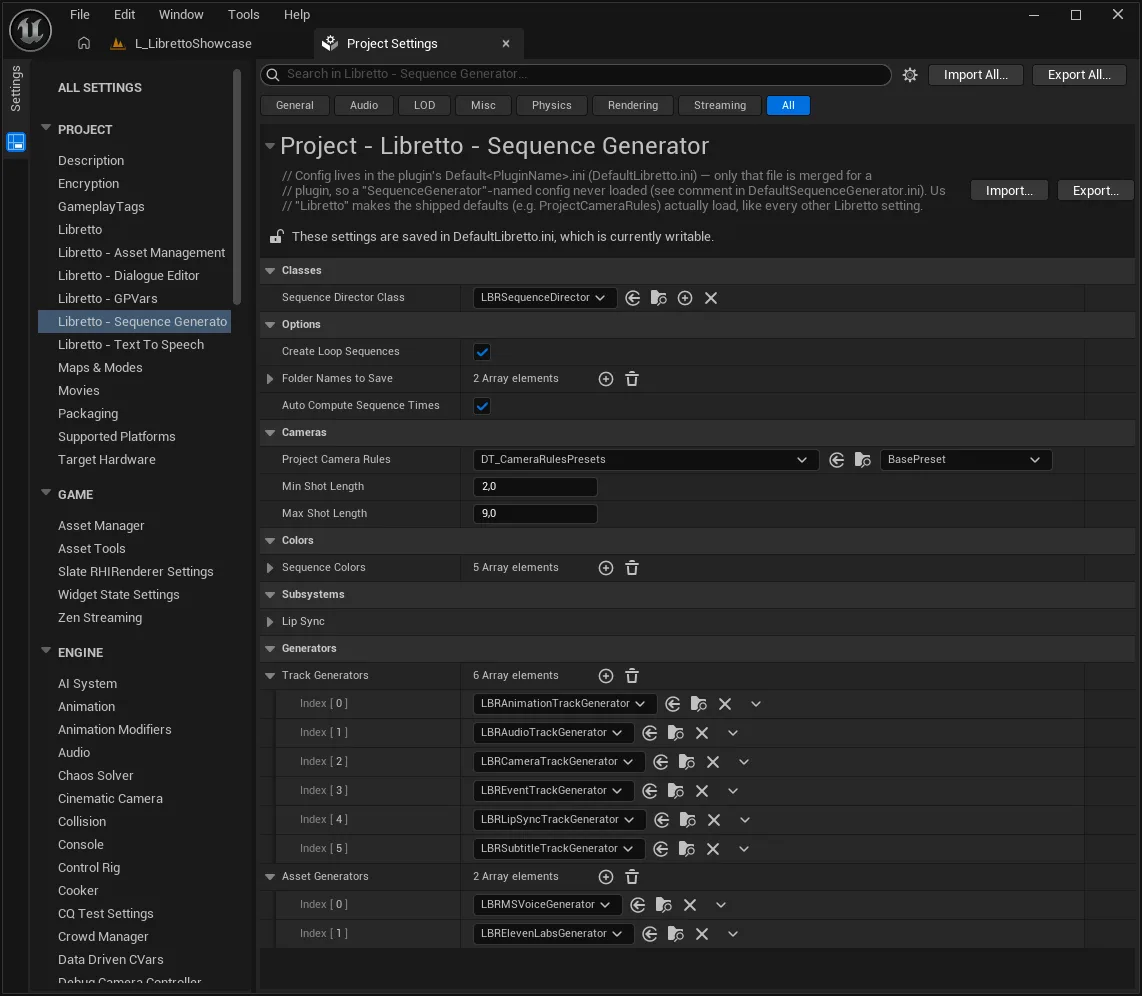
Register it in Project Settings ▸ Libretto – Sequence Generator ▸ Track Generators. It then appears in the wizard's Tracks to Generate list.
Gotcha
A full generation runs with Libretto.Generation.Tracks.All checked, which overwrites every
registered track type — yours included — so you must remove your previous output in
CleanSequence or it will pile up. Tracks placed under a folder in Folder Names To Save
(default VFX, Audio) are spared, which is how hand-made additions survive regeneration. If your
track consumes a brand-new asset, produce that in an asset generator (runs before tracks).
See also: Custom Track Generators · Writing your own generator
I want to generate a new kind of asset for my lines — a better lip-sync, for example
Alongside the track generators there is a second, earlier list of asset generators — they
produce the raw data a track later consumes (TTS audio, lip-sync animation…), and it is just as
open. Subclass ULBRAssetGenerator, register it, and it runs in the Generate Assets pass
before any Sequencer track is laid down.
- Start from what ships. Lip-sync is a good example: Libretto includes a simplistic
amplitude-based generator,
ULBRAmplitudeLipSyncGenerator, which bakes aMouthOpenmorph animation from the audio's RMS envelope — exactly as MSVoice and ElevenLabs ship for TTS. If you want phoneme/viseme-grade lip-sync, you replace this one generator, not the pipeline. - Write the class. Subclass
ULBRAssetGeneratorand give it a leaf tag underLibretto.Generation.Assets.TypesfromGetAssetID(e.g.…Types.LipSync) so it can be ticked on its own in the Generate Assets wizard. OverrideInitializeLine(does this line need anything?),GenerateLine(produce the asset — it must callLineGeneratedwhen done) andImportLine(bring the produced file into Unreal; leave it empty if, like the amplitude generator, you build theUAnimSequencein memory). UseGetDependanciesto declare asset types that must be generated first (a lip-sync pass needs the audio to already exist). - Register it in Project Settings ▸ Libretto – Sequence Generator ▸ Asset Generators. It
then appears in the wizard's Assets to Generate list, and the matching track** generator
(
LBRLipSyncTrackGenerator) places its output into the sequence automatically.
Gotcha
Asset generation is asynchronous and quota-based — GenerateLine must signal completion with
LineGenerated, or the pass stalls waiting for a line that never finishes. And remember the
two-list split: an asset generator produces the data, a track generator places it — a
new asset with no track to reference it is generated but never shows up in the sequence.
See also: Asset generators · Custom Track Generators · LipSync
I want to swap the audio backend or plug in another TTS provider
Libretto hides "where audio comes from" and "how speech is synthesised" behind abstract classes — subclass the right one and point the settings at it; the rest of the pipeline is untouched. This is exactly how the Wwise extension and the shipped TTS providers are built.
- Audio backend — the abstract
ULBRAudioAssethides the concrete audio class from the generators (the default isUSoundBase-based; Wwise supplies its own subclass, and the base explicitly anticipates backends like Wwise or FMod). Subclass it and setAudioAssetClass. - TTS provider — a
ULBRTTSGeneratorsubclass, driven byULBRTextToSpeechSubsystem, produces the temporary spoken audio. MSVoice and ElevenLabs ship; add your own to call a different synthesiser.
Gotcha
These are the supported seams — you replace a class and set one setting, you do not fork the plugin. If you find yourself editing Libretto's own source to change audio or speech, you are almost certainly missing one of these extension points.
See also: Voices — a more advanced TTS provider · Wwise — how it fits into Libretto · Custom Track Generators
My dialogue won't start (or hangs) when I trigger it
Almost always one of three things: the character doesn't implement the dialogue interface, the interface's start request never signals "ready", or the bodies aren't in the level. Work down this list before looking anywhere else.
- The character must implement
ILBRDialogueCharacter(in Blueprint or C++, or use a ready-made implementation likeALBRSimpleDialogueCharacter). A pawn that doesn't implement it can't take part in a dialogue. RequestStartDialoguemust call backULBRDialogueManager::OnDialogueCharacterReadyForDialogue. If your custom implementation forgets this, the dialogue waits forever for a character that never reports ready — that is the classic "it just hangs at the start" symptom.- The bodies must already be in the level. With no stage (3C), the generator binds to the first
actor of each character class found in the world — if the pawn isn't there, there is nothing to talk.
Launch with
StartDialogueInstance(or the Preview button to test in-editor).
Gotcha
A hang at start is a readiness problem, not a data problem — don't go rebuilding the dialogue
asset. Check the OnDialogueCharacterReadyForDialogue callback in your RequestStartDialogue
override first.
See also: Perspective — making a character able to talk · Getting started
Generation runs but produces an empty (or partial) sequence
The usual cause is a generation that didn't request all track types, or assets that weren't generated before the sequences. Both are quick to check in the Generate Sequences wizard.
- Leave the subdialogue flags ticked. The wizard defaults to generating all subdialogues and
all track types (
Libretto.Generation.Tracks.All). If you unticked things to scope a run, a too-narrow selection can leave the sequence empty — re-run with the defaults to confirm. - Generate Assets before Sequences. Spoken content (TTS, lip-sync) is produced by asset generation; run Generate Assets first, then Generate Sequences, or lines come out silent.
- Mind locked and preserved content. A subsequence you locked is skipped on regeneration (by design), and CleanAll vs the default incremental clean behave differently — see the Generation FAQ.
Gotcha
There is no "Compile" step in the editor generation flow — if you were looking for one, you
don't need it. (The compile call exists only in the headless CSV import pipeline, not the UI.)
See also: Generation · Generation — running generation
Something's off — where do I look?
Most Libretto problems have a specific, known place to check — this is the shortlist, each pointing to the entry that fixes it. When something misbehaves, start here rather than guessing.
- Cameras aim at a wall, or the view snaps back to gameplay — the occlusion fallback needs a cleared sibling camera, and a stage with no valid camera produces empty cuts → Cameras.
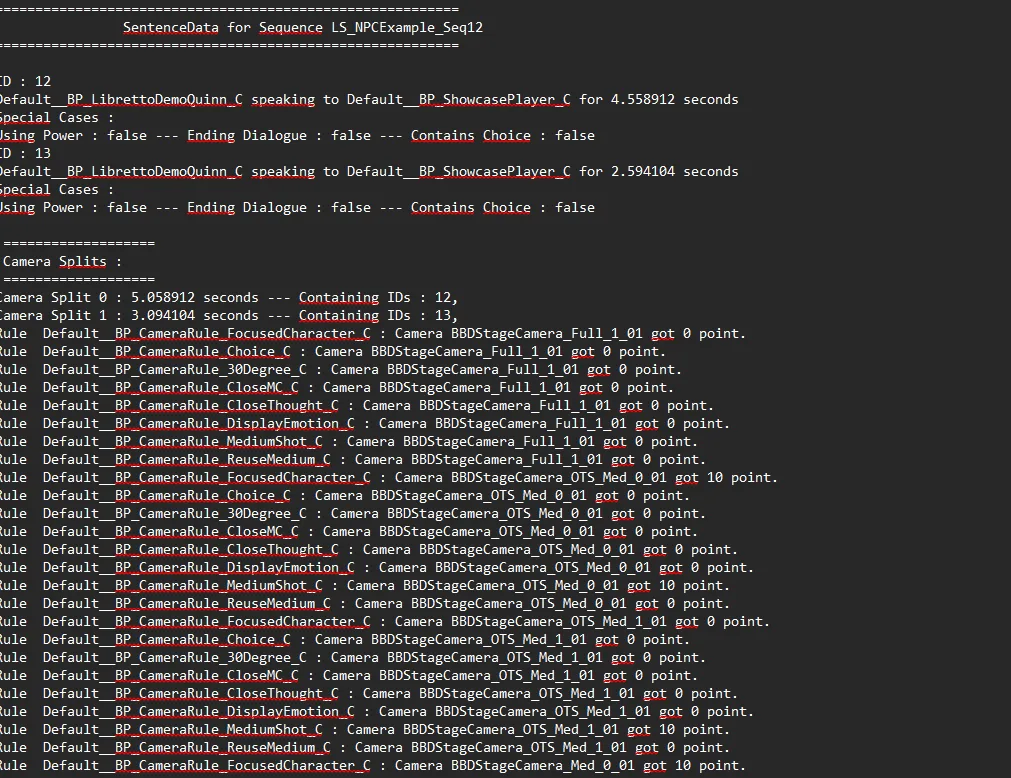
- A shot films the wrong character, or shots look random — the camera rules aren't wired; read the
per-dialogue log under
Saved/GenerationLog/Cameras/<Dialogue>.txt→ Cameras. - Dialogue tags are missing or out of sync (especially packaged) — delete the editor cache
Saved/LBRDynamicTags.cacheto force a re-scan → Data & logic. - Recording fails / no video — recording is Windows-only and needs the dialogue generated first; check the Output setting of your Recording Config → Generation.
- Wwise-backed generation reports missing/zero-length audio — Wwise isn't connected over WAAPI → the Wwise entry above.
- A line changed but its voice didn't — a normal pass only generates what's missing; re-voice with the Force flag, scoped by subdialogue → Voices.
Gotcha
When in doubt, read the generation log first. Generation writes per-dialogue reasoning under
Saved/GenerationLog/… — it usually tells you why a shot, a line or a track came out the way it
did, which is faster than re-running blind.
See also: How-to & FAQ overview · Cameras · Data & logic · Voices · Generation