Text to speech (TTS)
Text to speech generates spoken audio for a dialogue's lines automatically, so you can hear a dialogue play before any voice actor is recorded. It is not a replacement for recorded voice — it is a fast, cheap placeholder that lets you review timing, staging and cameras with real audio in the sequence.
TTS runs as an asset generator during generation: asset
generators run before the track generators, and the audio they produce is then consumed by the
LBRAudioTrackGenerator when it fills the audio track. See the generation
overview for where TTS sits in the pipeline and where the audio is
written.
What gets a voice
TTS is generated for Text lines only, and only when the line has a Speaker. In code the
generator skips any line whose type is not Text or that has no speaker
(Dialogue->Types[Index] != ELBRLineType::Text || !Dialogue->Speakers[Index]).
Voicing the player
Player responses are authored as Reply lines, and Replies get no TTS. To voice the
player, add real Text lines spoken by the player character (for example inside a Choice,
or after it) — those are the only player lines that produce audio.
Already-generated audio is not rebuilt on a normal run; set the Force flag on asset generation to overwrite stale audio after editing dialogue text (see Running generation).
Mount-aware output
Where the audio lands is handled by the generation pipeline, not by the providers: output is
mount-aware, so a dialogue delivered inside a plugin generates its TTS next to its
sequences inside that plugin instead of /Game. See the mount-aware output
note rather than repeating it here.
Providers at a glance
Libretto ships with two working providers.
| Provider | Where it runs | Network | Cost | Voice quality | Setup |
|---|---|---|---|---|---|
| MSVoice | Local (Windows speech API, SAPI) | None | Free | Basic, robotic | None — ships wired in the plugin .ini |
| ElevenLabs | Cloud (ElevenLabs API) | Required | Paid (API quota) | High, natural | API token + a character→voice DataTable |
The active provider is simply whichever TTS asset generator you tick in the Generate Assets
wizard. Both LBRMSVoiceGenerator and LBRElevenLabsGenerator are registered by default in the
Asset Generators list.
Settings
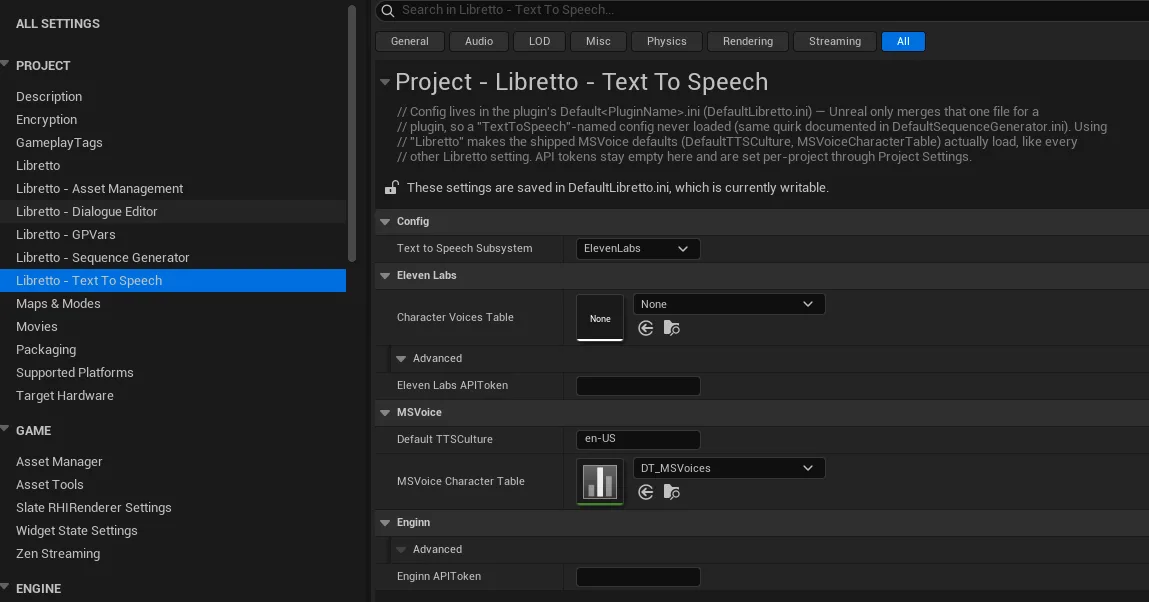
All TTS configuration lives in Project Settings ▸ Libretto – Text To Speech
(ULBRTextToSpeechSettings):
| Setting | Section | Purpose |
|---|---|---|
| Text To Speech Subsystem | Config | Name of the TTS subsystem to use (chosen from the installed options). |
| ElevenLabs API Token | ElevenLabs | Token for the ElevenLabs API — required to spend your own character quota. |
| Character Voices Table | ElevenLabs | DataTable mapping each character to an ElevenLabs voice. |
| Default TTS Culture | MSVoice | Default language / locale (e.g. en-US) used when a character row does not specify one — drives both voice pick and spoken language. Defaults to en-US. |
| MSVoice Character Table | MSVoice | DataTable (rows of FLBRMSVoiceCharacterDesc) mapping each character to a Windows voice / language / prosody. |
Defaults ship in the plugin .ini
ULBRTextToSpeechSettings uses Config = "Libretto", so its shipped defaults live in the
plugin's DefaultLibretto.ini (Unreal only merges that one config file for a plugin, so a
TextToSpeech-named config would never load). The plugin ships:
[/Script/LBRTextToSpeechEditor.LBRTextToSpeechSettings]
DefaultTTSCulture=en-US
MSVoiceCharacterTable=/Libretto/Examples/Characters/DT_MSVoices.DT_MSVoices
The MSVoiceCharacterTable points at example content shipped with the plugin as a soft
reference. API tokens stay empty in the .ini — set them per project through Project Settings.
MSVoice — local Windows voices
ULBRMSVoiceGenerator produces audio with the Windows speech API (SAPI 5, called in process). It is local and
free, needs no network, and works out of the box — which makes it the natural default for
day-to-day iteration.
How a voice is picked
For each Text line, MSVoice resolves the speaker's voice, language and prosody, then builds an
SSML document and synthesises it:
- If the speaker has a row in the MSVoice Character Table, that row's voice / culture / prosody is used.
- Otherwise the generator auto-picks a voice by the character's gender — read from the
LBRDialogueCharacterinterface viaILBRDialogueCharacter::LBRGetCharacterGender— combined with the culture. This is still fully valid: the language is correct, just without an explicit voice or prosody.
The SSML it builds looks like this (a gendered auto-pick, then an explicit voice by name):
<speak version="1.0" xmlns="http://www.w3.org/2001/10/synthesis" xml:lang="en-US">
  <voice gender="male" xml:lang="en-US">
    <prosody pitch="-20%" rate="-6%">Your line text here.</prosody>
  </voice>
</speak>
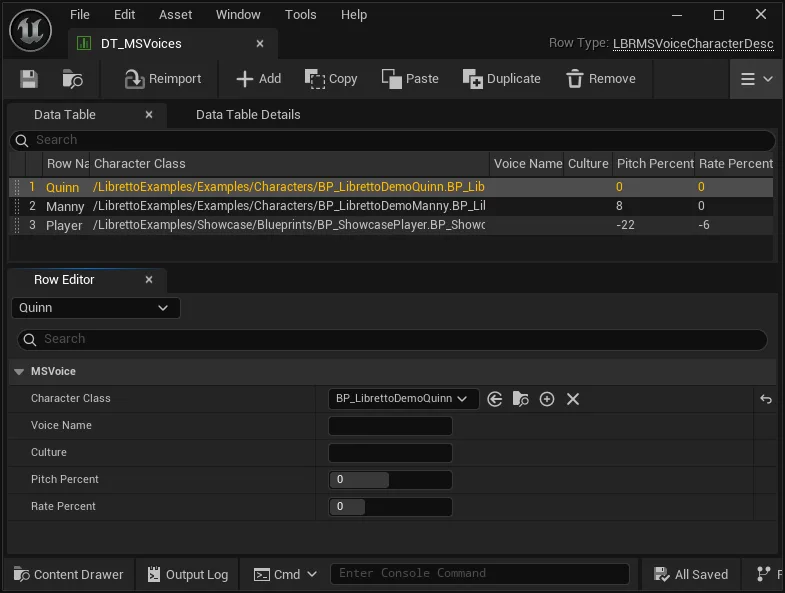
The character table (DT_MSVoices)
Each row of the MSVoice table is a FLBRMSVoiceCharacterDesc:
| Field | Purpose |
|---|---|
| Character Class | The dialogue character this row applies to. |
| Voice Name | An explicit installed Windows voice (e.g. Microsoft David Desktop). Leave empty to auto-pick the best installed voice for the character's gender + culture — portable across machines. |
| Culture | Voice language / locale (e.g. en-US, fr-FR). Empty falls back to Default TTS Culture. |
| Pitch Percent | Relative pitch offset, percent (e.g. -20 = lower). Clamped to −100…100. |
| Rate Percent | Speaking-rate offset, percent (e.g. -6 = slower). Clamped to −90…200. |
Let the culture follow the generation culture
Leave a row's Culture empty so the voice follows the generation culture (via Default TTS Culture). Filling it pins that character to a specific language regardless of the culture you generate — useful for a foreign-speaking character, unhelpful otherwise.
Two characters, one voice, told apart by prosody
A typical machine has only two English (en-US) SAPI voices installed (David and Zira). Two male en-US characters therefore both map to David. Differentiate them with Pitch Percent and Rate Percent: give one a lower pitch and/or a different rate so the two are audibly distinct even though they share the underlying voice.
Installing more voices
Voice availability depends on the machine's installed Windows language / speech packs. If you only have two voices, install additional SAPI voices via Windows Settings ▸ Time & Language ▸ Speech to widen the pool the auto-pick can draw from.
ElevenLabs — cloud, high quality
ULBRElevenLabsGenerator calls the ElevenLabs cloud API. It produces the most natural audio of
the three, at the cost of a network connection and a paid quota.
To use it:
- Put your ElevenLabs API Token in the TTS settings.
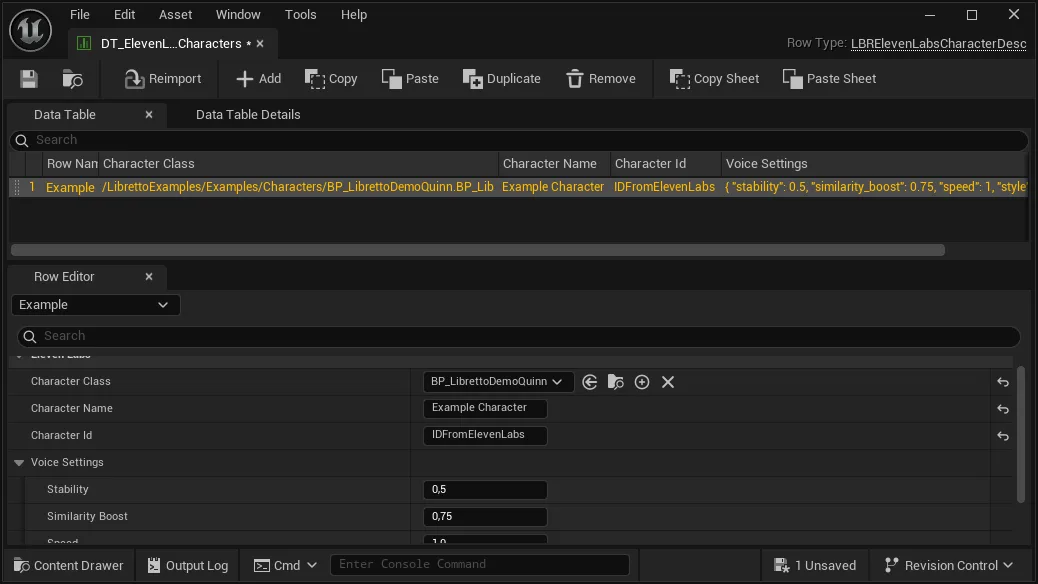
- Set the Character Voices Table — a DataTable mapping each character to an ElevenLabs voice and its voice settings (stability, similarity, speed, style, speaker boost).
ElevenLabs row type
The Character Voices Table is a DataTable whose row struct is
FLBRElevenLabsCharacterDesc — it maps a character class to a name, a voice id, and an
embedded FLBRElevenLabsVoiceSettings (the voice parameters). Create your table with that row
type.
Quota and cost
Every generated line spends ElevenLabs quota. Because a full dialogue regenerates many lines, prefer generating only what you need (per-subdialogue selection, and rely on the skip already-generated behaviour rather than Force). TTS also makes generation noticeably slower — see the warning on the overview page.